 Checkout Bench in Action: See Amtrak from Search to Payment
See how two Pacific Surfliner tickets went from a station search to a $144 checkout, with all 34 screens shown side by side with our annotations and digital twins.
Los Angeles Union Station · San Diego Santa Fe Depot
Dec 4–6 · Two adults · Coach Flex
$144 due / $0 chargedSee checkoutSign in
We dismissed the cookie banner, opened Guest Rewards and signed in. Amtrak then brought us back to the booking form.
01Cookie choices
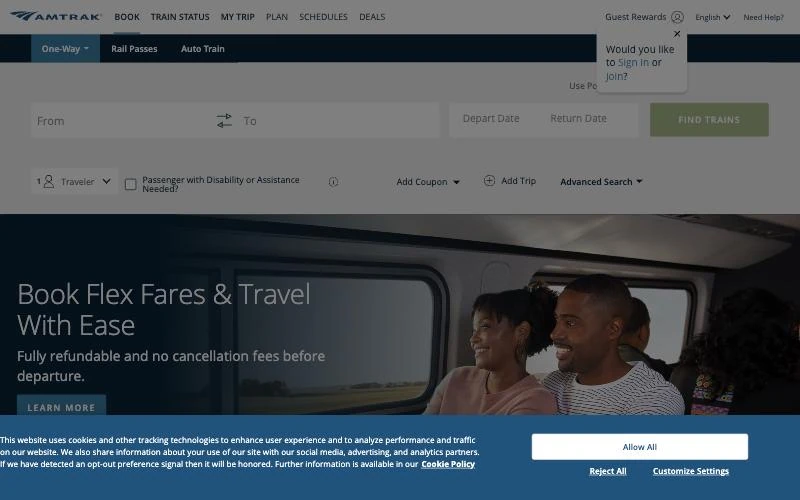
The cookie banner covered the booking controls while a Guest Rewards prompt was also open. We chose Reject All so we could use the form.
Next: Dismiss cookie banner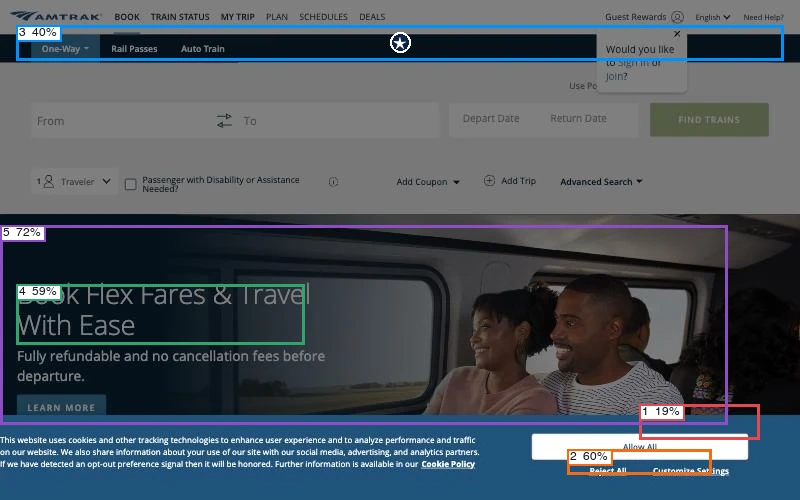
Predicted first click: navigation (25%). The model rated action clarity at 61%, hierarchy at 32% and readability at 66%.
View scores
| Region | Confidence | First click |
|---|---|---|
| 1 · Primary action | 19% | 23% |
| 2 · Secondary action | 60% | 10% |
| 3 · Navigation | 40% | 25% |
| 4 · Main heading | 59% | 20% |
| 5 · Main visual | 72% | 22% |
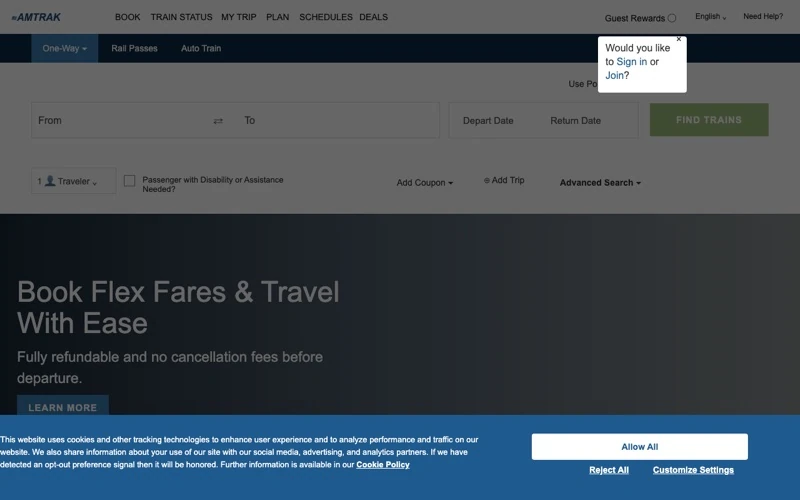
The reconstruction keeps the consent controls along the bottom and the sign-in prompt in the upper corner. The train photograph becomes a dark wash behind them. Match score: 67%.
02The signed-out booking form
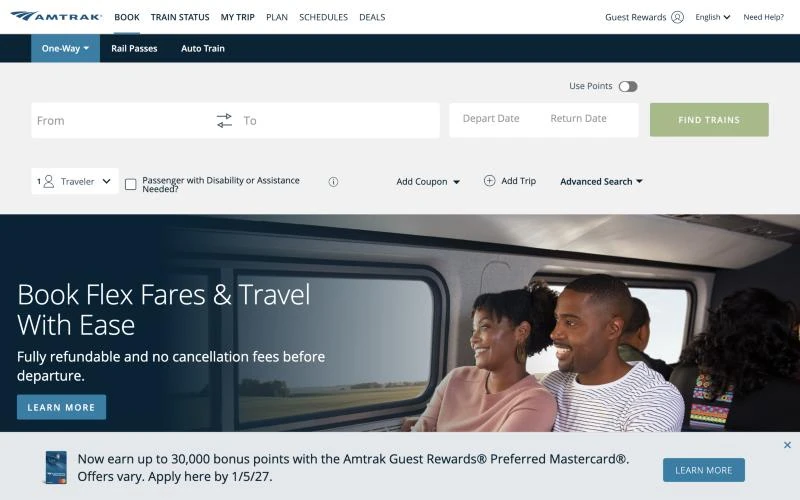
Our first attempt to dismiss the banner closed the sign-in prompt instead. A second click dismissed the banner and exposed the booking form. A dismissible rewards-card promotion remained along the bottom.
Next: Open Guest Rewards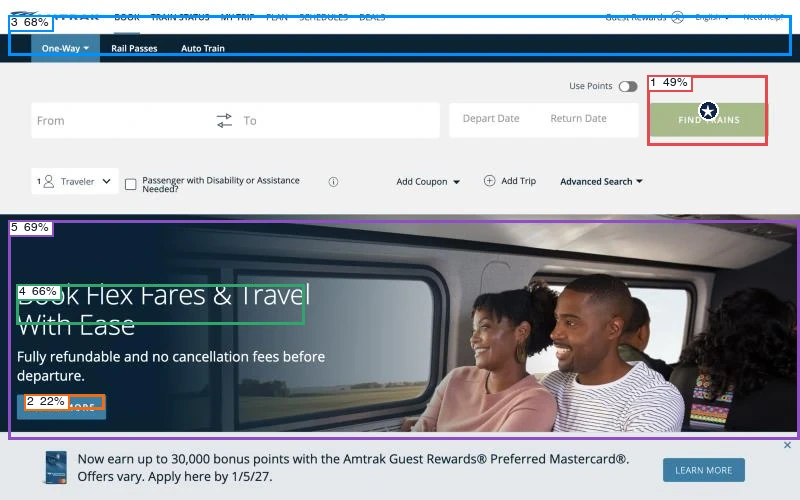
Predicted first click: primary action (50%). The model rated action clarity at 81%, hierarchy at 55% and readability at 89%.
View scores
| Region | Confidence | First click |
|---|---|---|
| 1 · Primary action | 49% | 50% |
| 2 · Secondary action | 22% | 3% |
| 3 · Navigation | 68% | 15% |
| 4 · Main heading | 66% | 21% |
| 5 · Main visual | 69% | 11% |
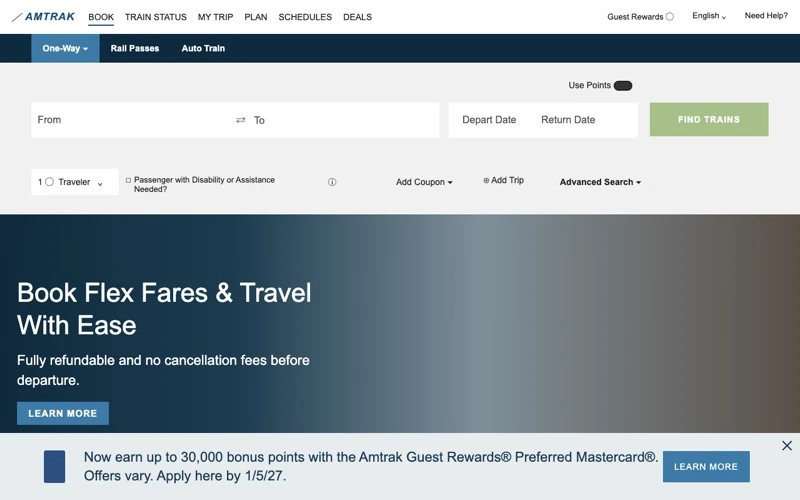
With the banner gone, the twin reproduces the station fields and the pale Find Trains button above the promotion. Match score: 67%.
03Opening Guest Rewards
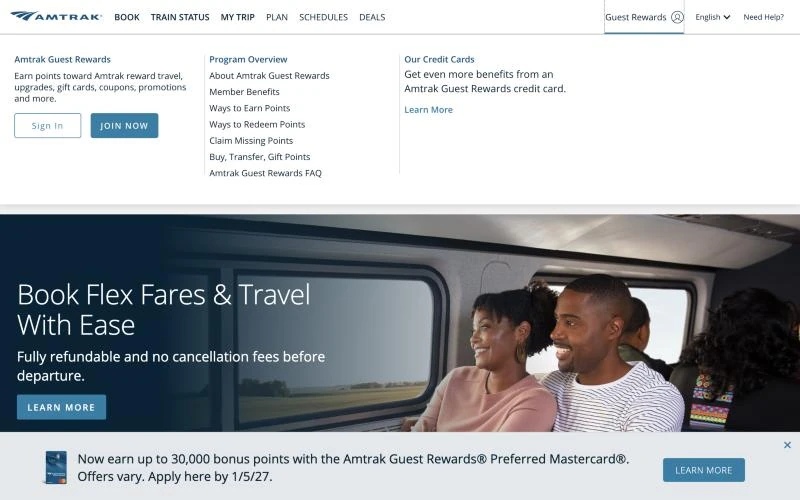
Sign In appeared inside Guest Rewards after the menu had been open for about two seconds. Clicking the trigger again during that delay could close the menu.
Next: Choose Sign In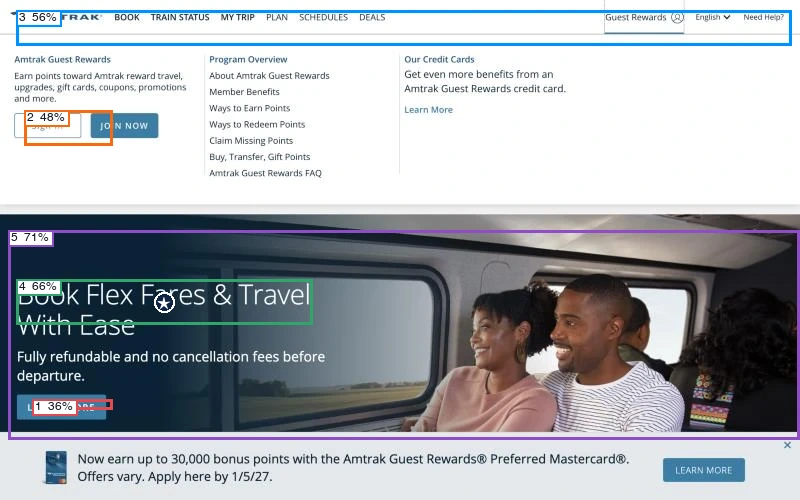
Predicted first click: main heading (30%). The model rated action clarity at 34%, hierarchy at 63% and readability at 80%.
View scores
| Region | Confidence | First click |
|---|---|---|
| 1 · Primary action | 36% | 18% |
| 2 · Secondary action | 48% | 2% |
| 3 · Navigation | 56% | 25% |
| 4 · Main heading | 66% | 30% |
| 5 · Main visual | 71% | 25% |
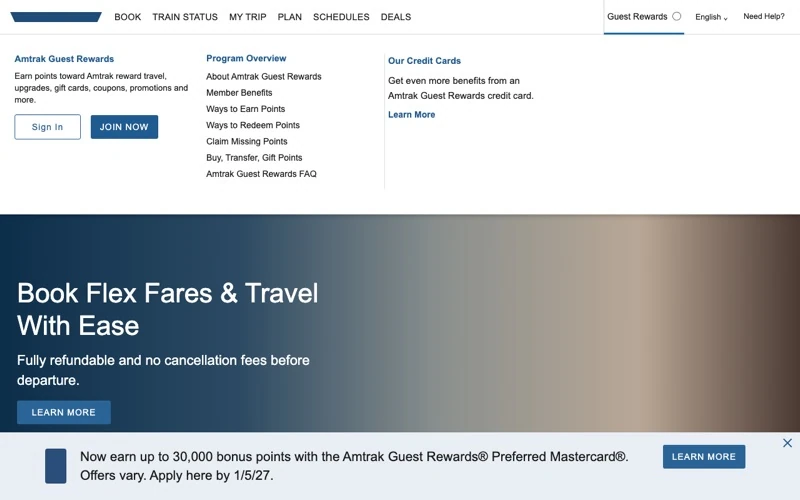
The twin retains the open menu, including the outlined Sign In control beside Join Now. Match score: 89%.
04Member sign-in
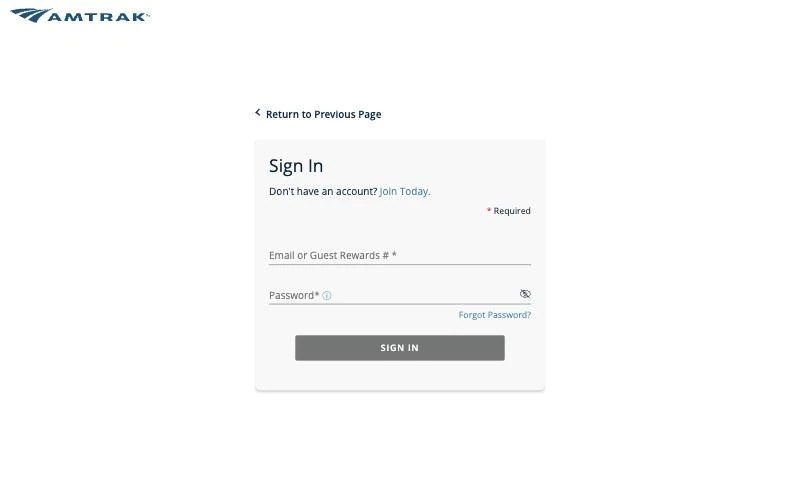
Amtrak opened a separate sign-in page where the member entered an email or rewards number and a password. Sign In stayed gray until both fields were filled.
Next: Enter member credentials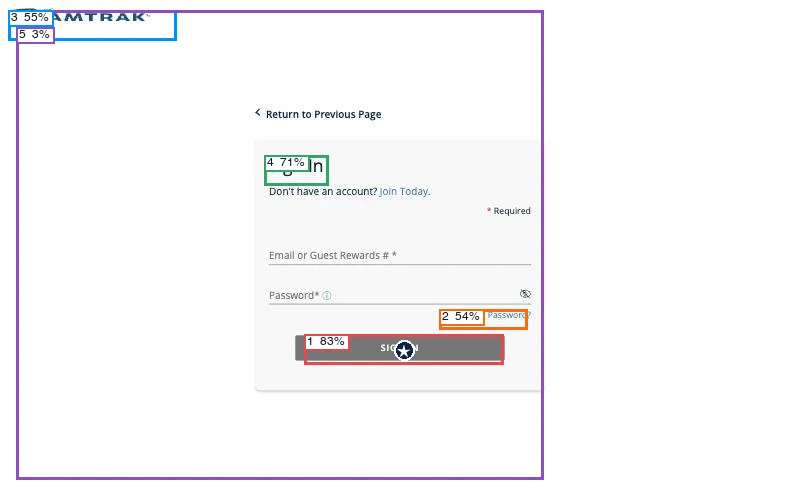
Predicted first click: primary action (59%). The model rated action clarity at 96%, hierarchy at 84% and readability at 89%.
View scores
| Region | Confidence | First click |
|---|---|---|
| 1 · Primary action | 83% | 59% |
| 2 · Secondary action | 54% | 18% |
| 3 · Navigation | 55% | 11% |
| 4 · Main heading | 71% | 12% |
| 5 · Main visual | 3% | 0% |
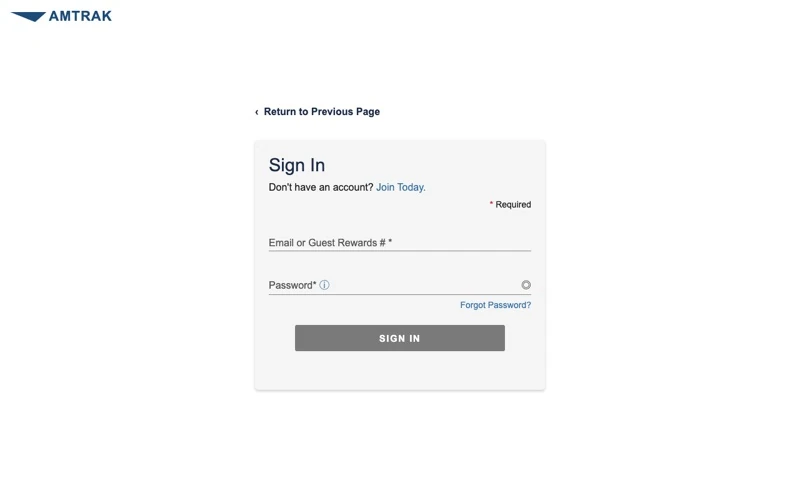
The reconstruction preserves the compact form in the middle of a mostly empty page. Match score: 56%.
05Returning to the home page
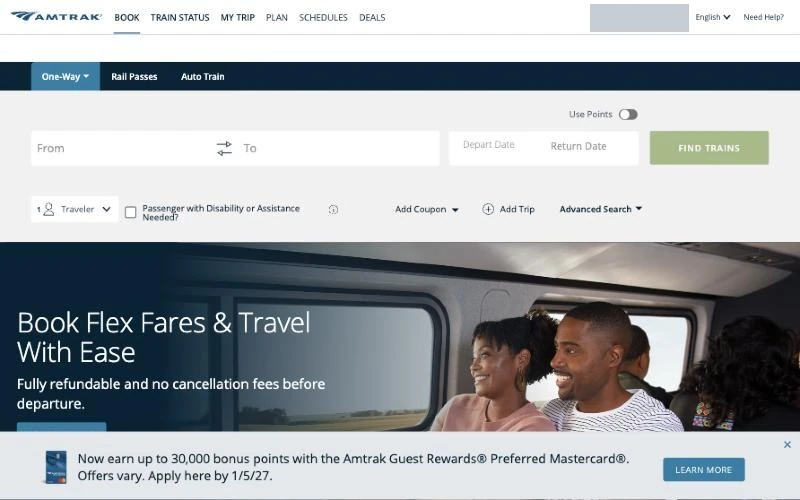
After sign-in, the member’s first name replaced Guest Rewards in the header. The booking form otherwise looked the same, and we continued to the departure field. A blank band briefly appeared beneath the header while the page loaded.
Next: Open the departure field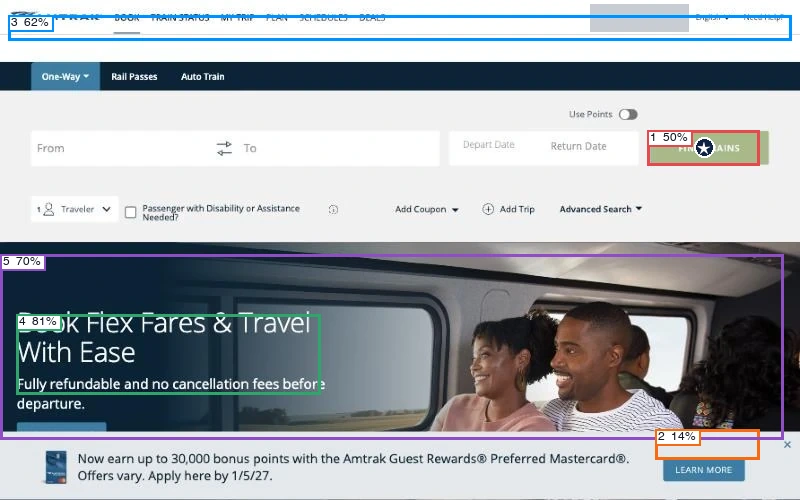
Predicted first click: primary action (48%). The model rated action clarity at 83%, hierarchy at 48% and readability at 84%.
View scores
| Region | Confidence | First click |
|---|---|---|
| 1 · Primary action | 50% | 48% |
| 2 · Secondary action | 14% | 1% |
| 3 · Navigation | 62% | 25% |
| 4 · Main heading | 81% | 14% |
| 5 · Main visual | 70% | 12% |
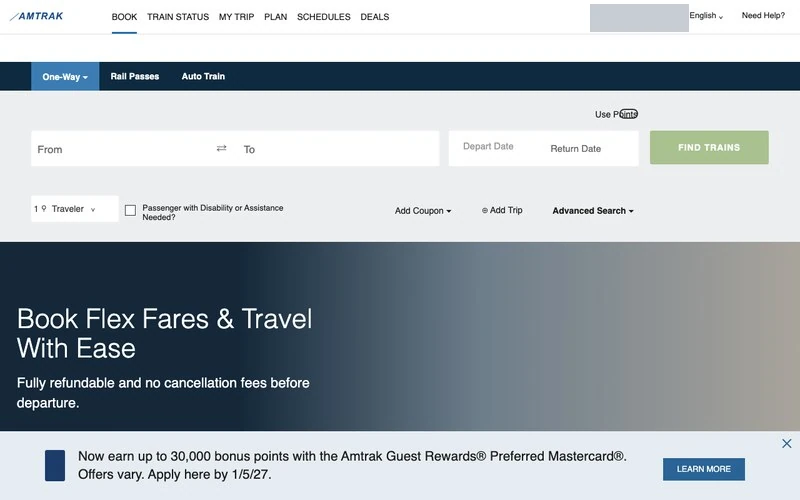
The twin returns to the same booking layout. Personal account details are masked in the published views. Match score: 89%.
Stations, dates and passengers
We wanted two coach seats from Los Angeles Union Station to San Diego Santa Fe Depot on Friday, December 4, returning around noon on Sunday, December 6. Before searching for trains, the form had to distinguish cities from stations and a return date from a replacement departure date.
06Choosing Los Angeles Union Station
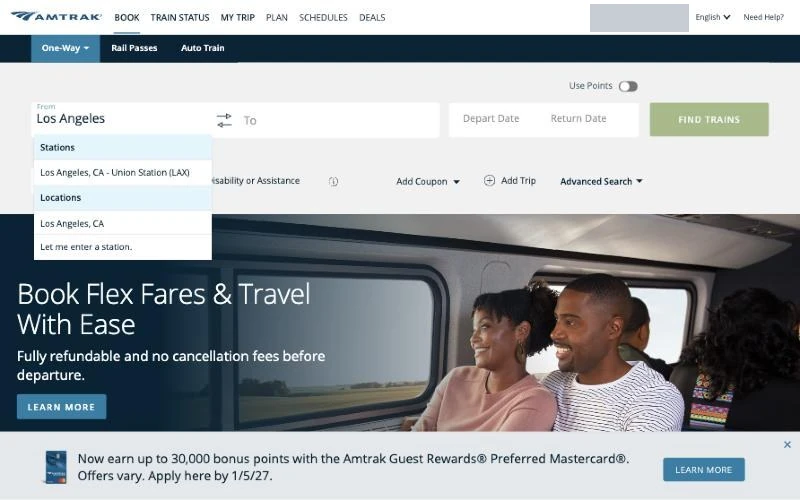
Searching for Los Angeles offered a station, a city location and an option to enter a station manually. We selected Union Station (LAX) for the departure.
Next: Select Union Station (LAX)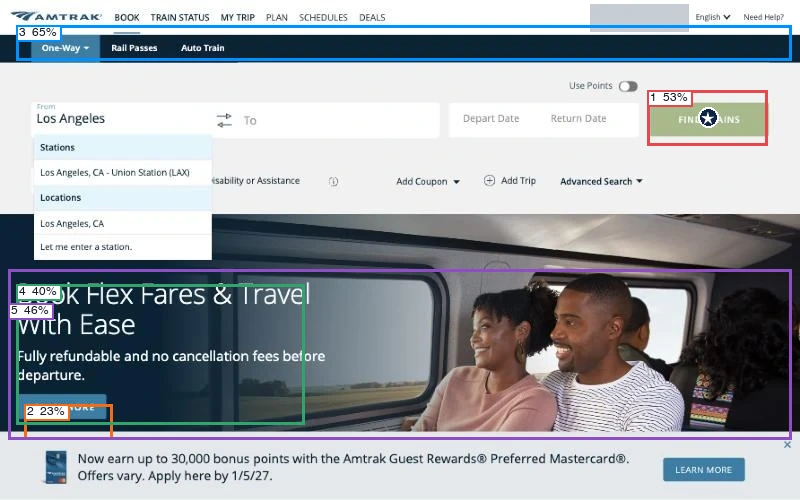
Predicted first click: primary action (50%). The model rated action clarity at 79%, hierarchy at 51% and readability at 86%.
View scores
| Region | Confidence | First click |
|---|---|---|
| 1 · Primary action | 53% | 50% |
| 2 · Secondary action | 23% | 2% |
| 3 · Navigation | 65% | 18% |
| 4 · Main heading | 40% | 14% |
| 5 · Main visual | 46% | 16% |
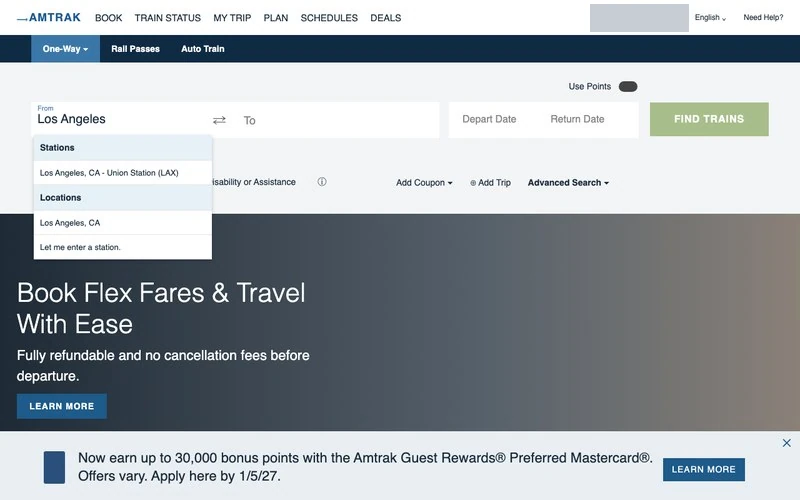
The suggestions appear beneath the departure field in both versions while the rest of the form stays in place. Match score: 67%.
07Choosing a San Diego station
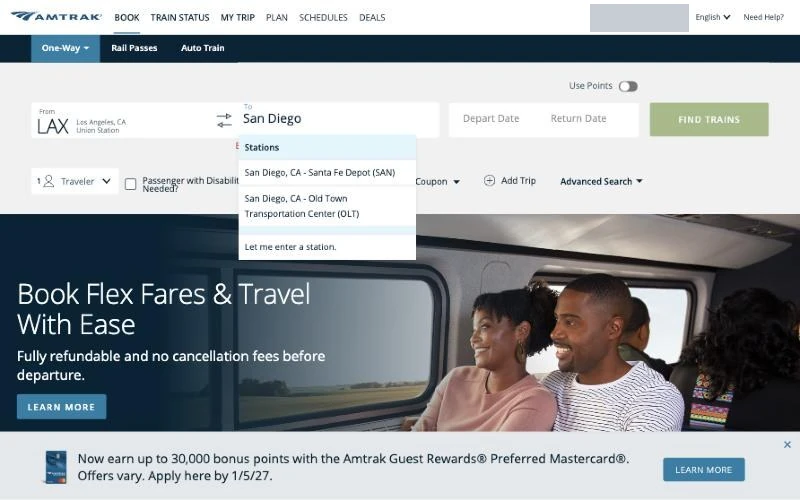
The destination field offered Santa Fe Depot (SAN) and Old Town (OLT). We picked Santa Fe Depot for a downtown arrival. A city name alone would have left that choice unresolved.
Next: Select Santa Fe Depot (SAN)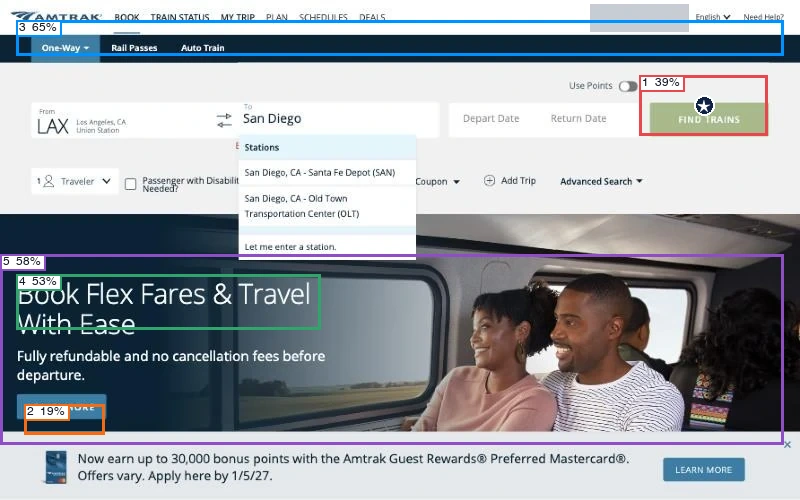
Predicted first click: primary action (60%). The model rated action clarity at 78%, hierarchy at 49% and readability at 85%.
View scores
| Region | Confidence | First click |
|---|---|---|
| 1 · Primary action | 39% | 60% |
| 2 · Secondary action | 19% | 2% |
| 3 · Navigation | 65% | 15% |
| 4 · Main heading | 53% | 13% |
| 5 · Main visual | 58% | 10% |
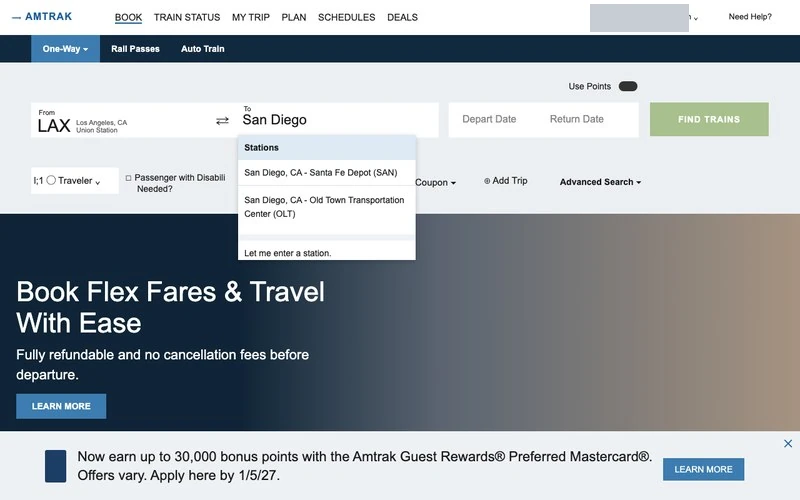
The twin retains the two San Diego options beneath the active destination field. Match score: 78%.
08Opening the calendar
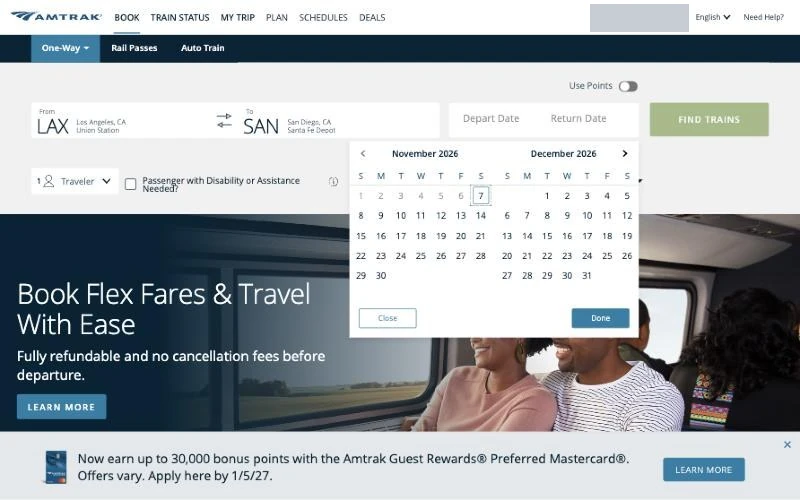
The date picker showed two months with past dates disabled and the current day outlined. At this point the search was still set to one way.
Next: Choose December 4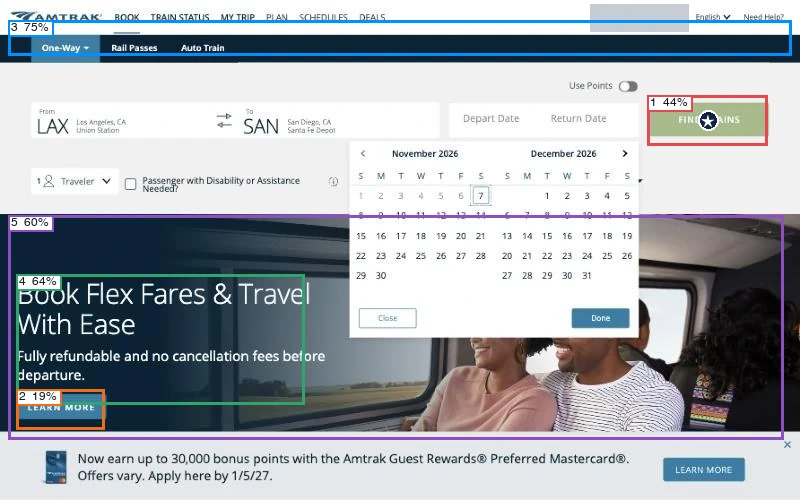
Predicted first click: primary action (53%). The model rated action clarity at 75%, hierarchy at 47% and readability at 89%.
View scores
| Region | Confidence | First click |
|---|---|---|
| 1 · Primary action | 44% | 53% |
| 2 · Secondary action | 19% | 3% |
| 3 · Navigation | 75% | 16% |
| 4 · Main heading | 64% | 20% |
| 5 · Main visual | 60% | 8% |
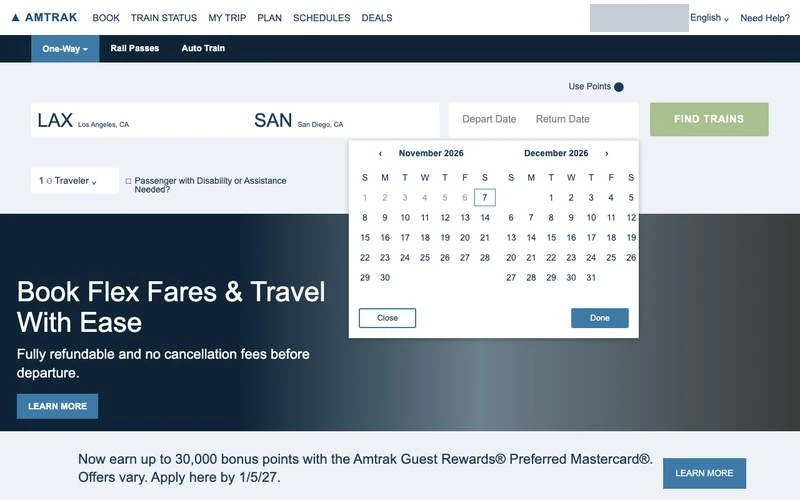
The calendar also floats above the promotion in the twin, whose plainer background makes its edge easier to distinguish. Match score: 78%.
09Switching to round trip
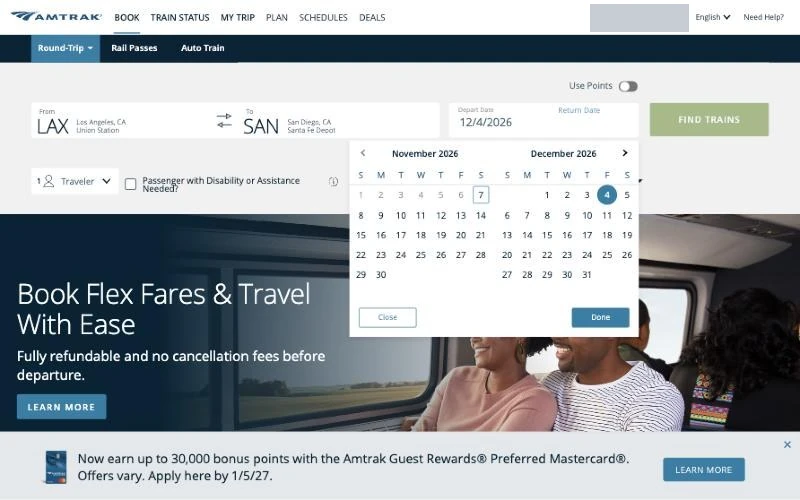
While the departure field was active, each new date replaced the previous departure. Clicking Return Date changed the trip type to round trip so we could enter Sunday’s return.
Next: Choose December 6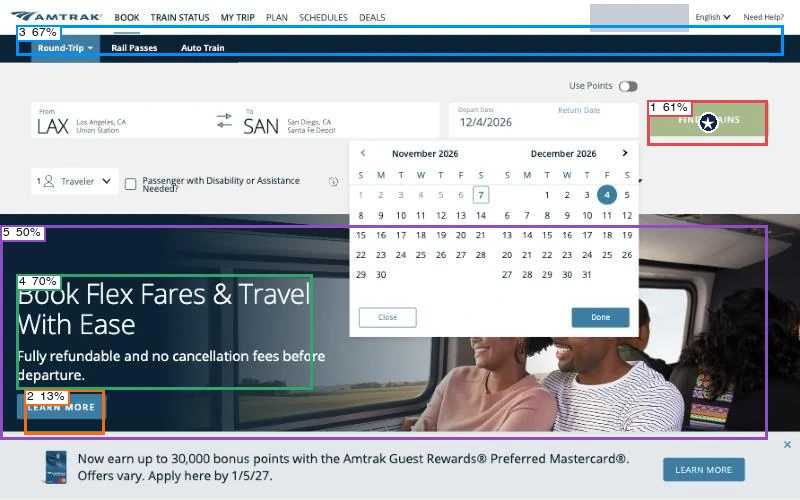
Predicted first click: primary action (64%). The model rated action clarity at 73%, hierarchy at 45% and readability at 89%.
View scores
| Region | Confidence | First click |
|---|---|---|
| 1 · Primary action | 61% | 64% |
| 2 · Secondary action | 13% | 2% |
| 3 · Navigation | 67% | 15% |
| 4 · Main heading | 70% | 14% |
| 5 · Main visual | 50% | 5% |
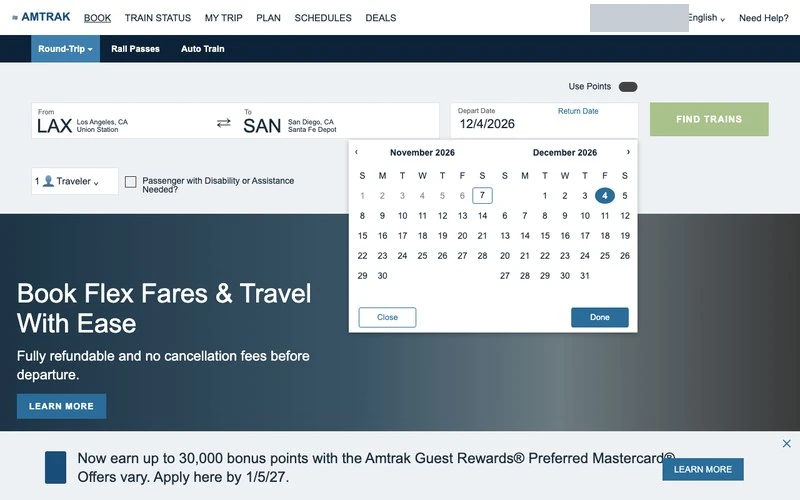
The reconstructed calendar appears beside the date fields, with the selected departure still in view. Match score: 67%.
10Checking both dates
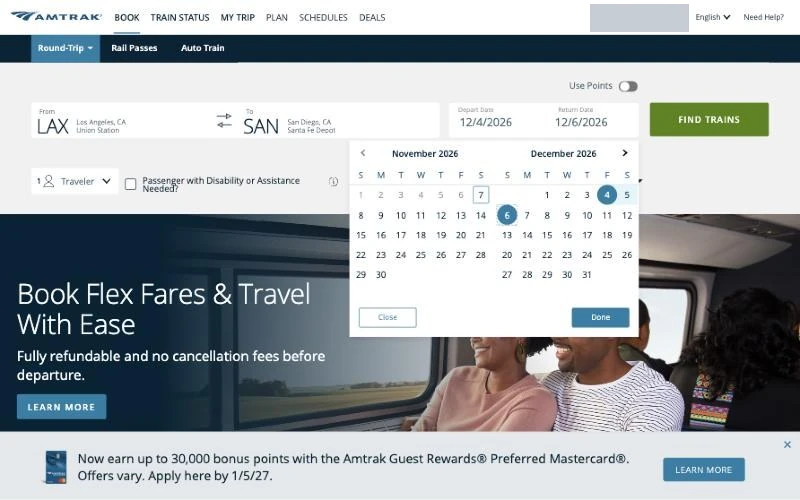
December 4 and December 6 appeared together in the search field and were circled in the calendar. We checked both before closing it with Done.
Next: Close the calendar with Done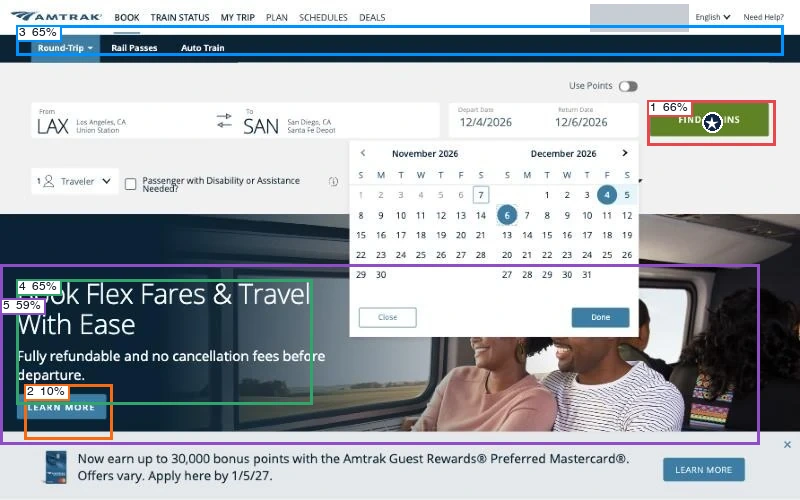
Predicted first click: primary action (70%). The model rated action clarity at 81%, hierarchy at 47% and readability at 91%.
View scores
| Region | Confidence | First click |
|---|---|---|
| 1 · Primary action | 66% | 70% |
| 2 · Secondary action | 10% | 1% |
| 3 · Navigation | 65% | 9% |
| 4 · Main heading | 65% | 15% |
| 5 · Main visual | 59% | 5% |
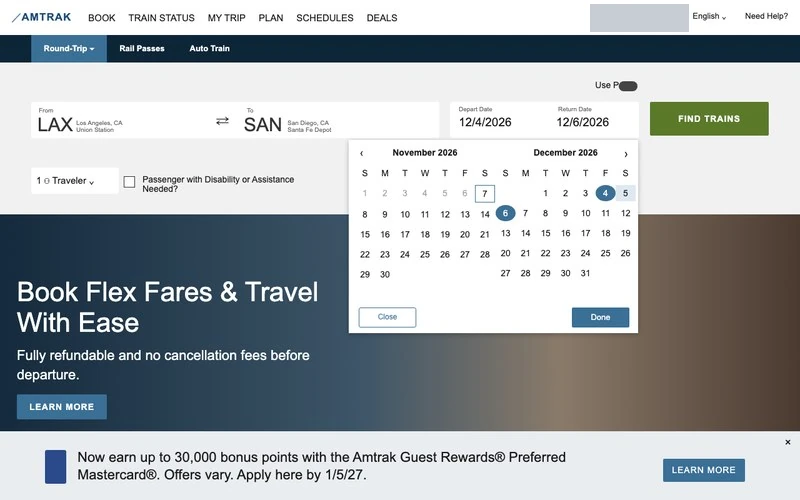
The twin retains the marked dates and the controls at the bottom of the open calendar. Match score: 78%.
11Opening the traveler list
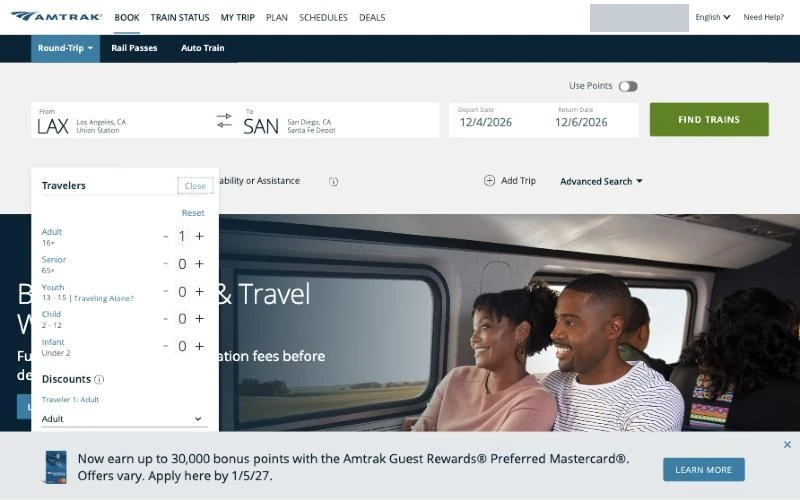
The traveler picker separated adults, seniors, youths, children and infants, with discounts selected separately. We increased the adult count for the second passenger.
Next: Add one adult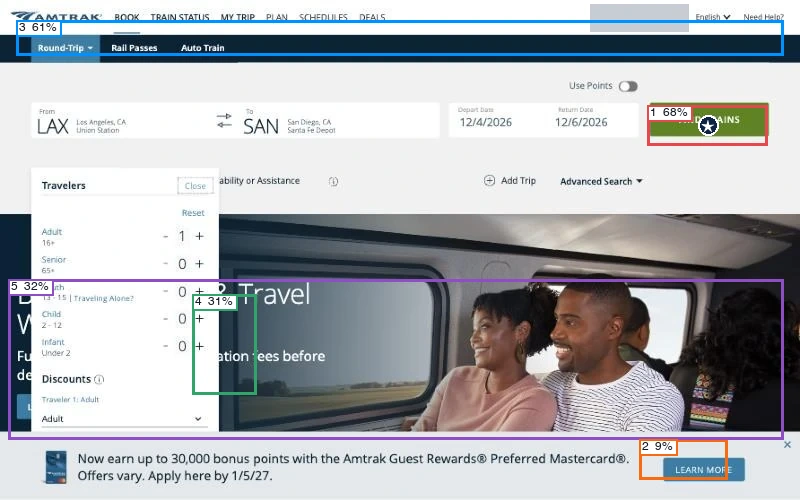
Predicted first click: primary action (81%). The model rated action clarity at 84%, hierarchy at 41% and readability at 67%.
View scores
| Region | Confidence | First click |
|---|---|---|
| 1 · Primary action | 68% | 81% |
| 2 · Secondary action | 9% | 1% |
| 3 · Navigation | 61% | 11% |
| 4 · Main heading | 31% | 1% |
| 5 · Main visual | 32% | 6% |
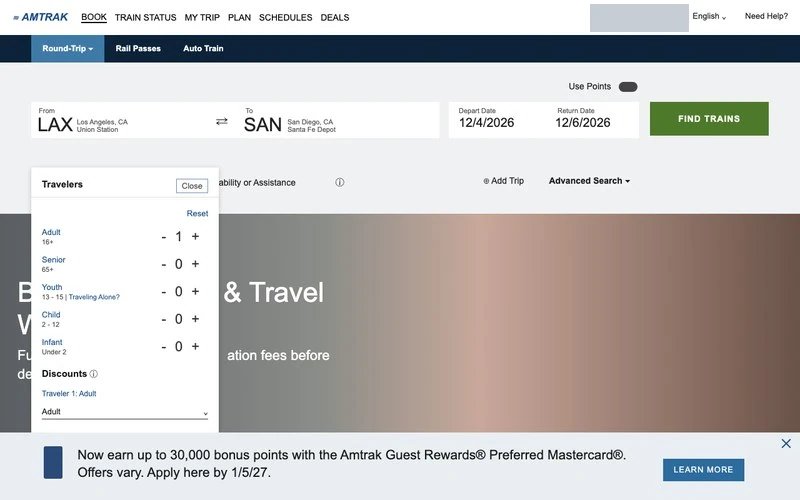
The reconstruction keeps the passenger categories and quantity controls in the panel below the form. Match score: 67%.
12Searching for two adults
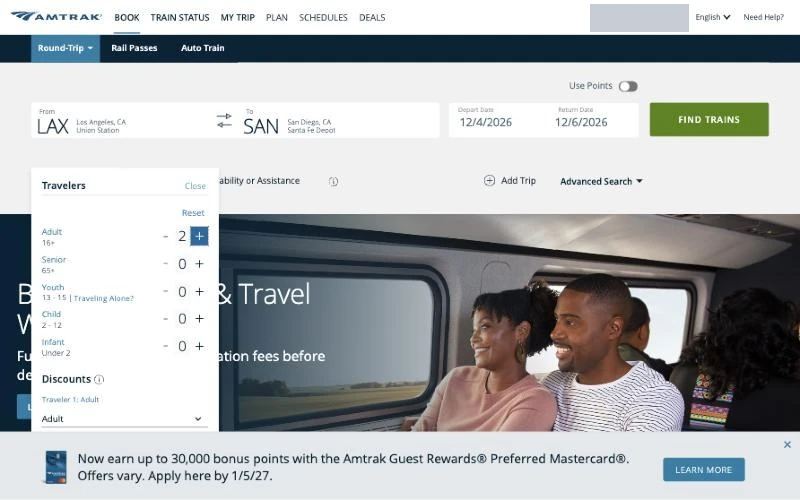
The form showed two adults with the stations and dates filled in. After closing the picker, we used the green Find Trains button.
Next: Close the picker and find trains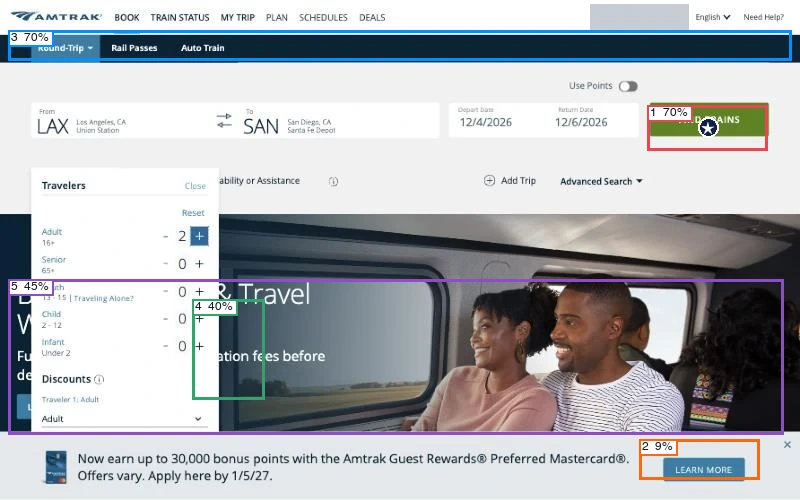
Predicted first click: primary action (80%). The model rated action clarity at 84%, hierarchy at 41% and readability at 73%.
View scores
| Region | Confidence | First click |
|---|---|---|
| 1 · Primary action | 70% | 80% |
| 2 · Secondary action | 9% | 1% |
| 3 · Navigation | 70% | 11% |
| 4 · Main heading | 40% | 1% |
| 5 · Main visual | 45% | 7% |
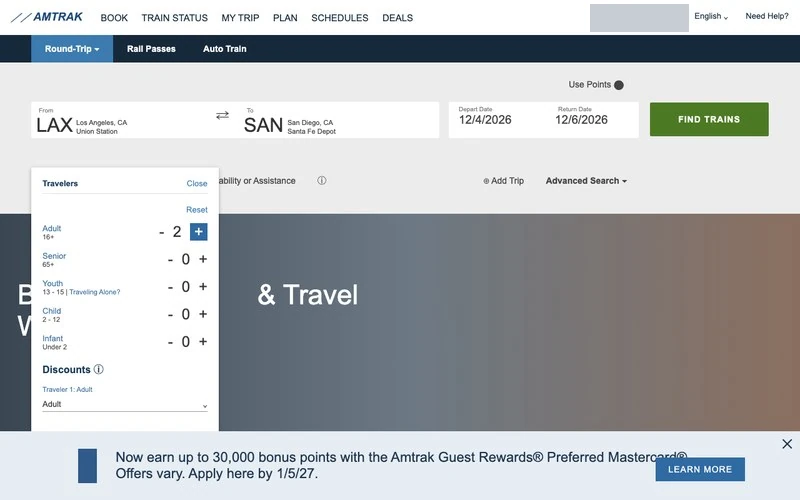
The twin preserves the active search button and the selected count while the passenger picker is open. Match score: 67%.
Choose trains
We chose a fare for each direction. Several departures cost the same, so we checked the train number and departure time before adding each one.
13Reading outbound departures
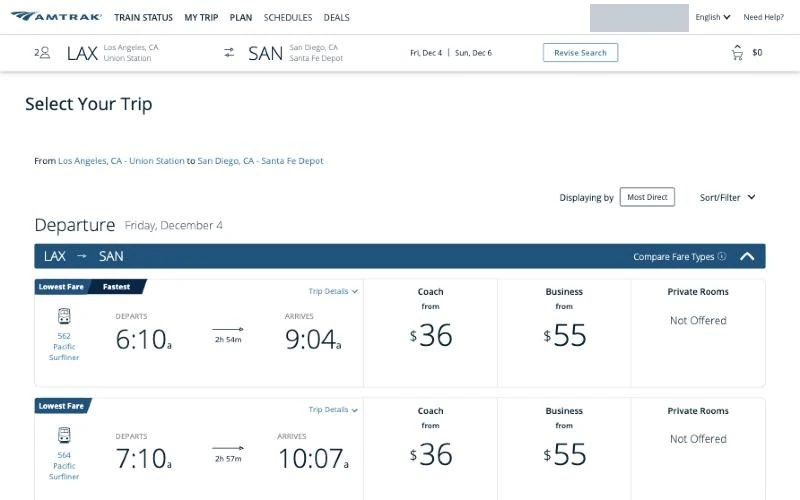
Train 562 left Union Station at 6:10 a.m. and reached Santa Fe Depot at 9:04 a.m. Coach started at $36 per traveler and Business at $55, while the cart was still empty. We opened Coach on the 562 row.
Next: Open Coach on train 562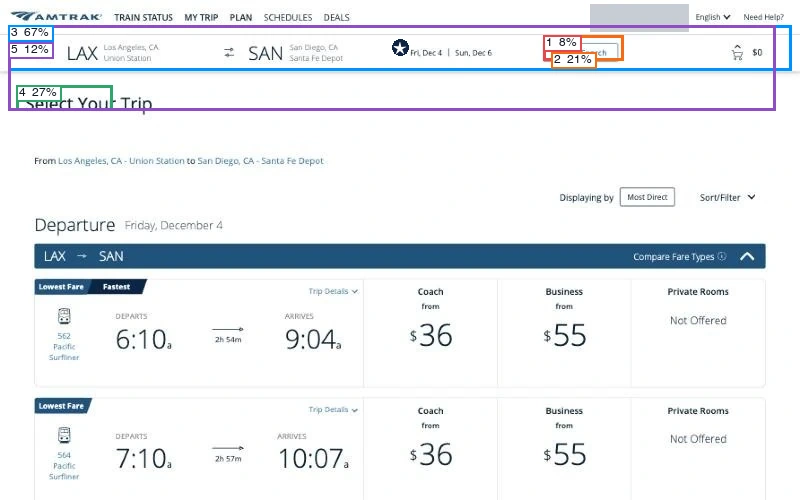
Predicted first click: navigation (40%). The model rated action clarity at 57%, hierarchy at 52% and readability at 77%.
View scores
| Region | Confidence | First click |
|---|---|---|
| 1 · Primary action | 8% | 19% |
| 2 · Secondary action | 21% | 6% |
| 3 · Navigation | 67% | 40% |
| 4 · Main heading | 27% | 33% |
| 5 · Main visual | 12% | 2% |
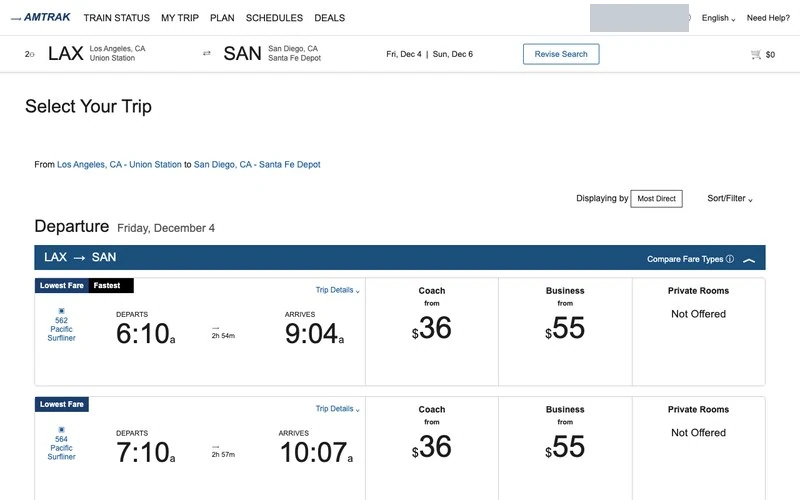
Both timetables show the departure and arrival times. On the original, the CB decision model marked Revise Search as the main action. We needed the Coach fare farther down the page. Match score: 44%.
14Opening Coach Flex
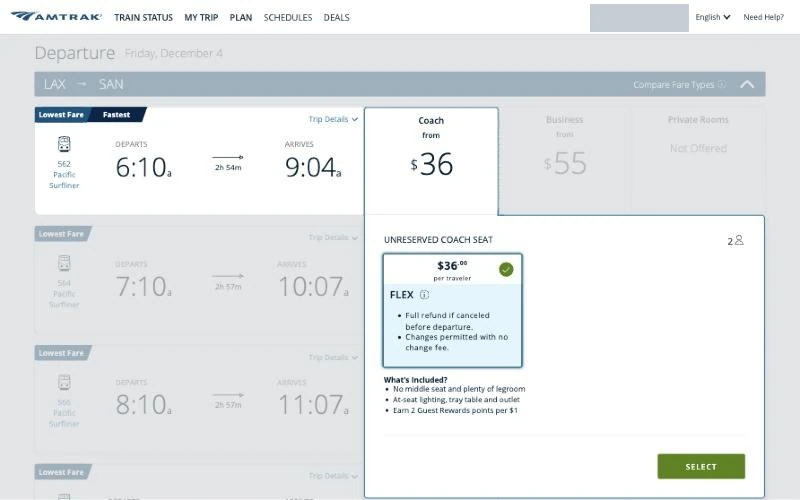
The open panel offered an unreserved Coach Flex seat for $36 per traveler, with a full refund before departure and changes without a fee. The fare was preselected and still required Select. Opening the fare panel dimmed the rest of the timetable.
Next: Select the outbound fare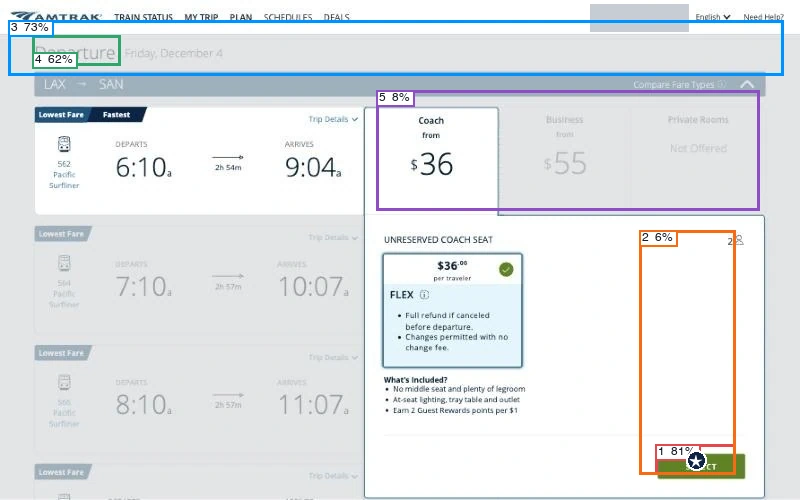
Predicted first click: primary action (50%). The model rated action clarity at 75%, hierarchy at 73% and readability at 60%.
View scores
| Region | Confidence | First click |
|---|---|---|
| 1 · Primary action | 81% | 50% |
| 2 · Secondary action | 6% | 2% |
| 3 · Navigation | 73% | 29% |
| 4 · Main heading | 62% | 12% |
| 5 · Main visual | 8% | 7% |
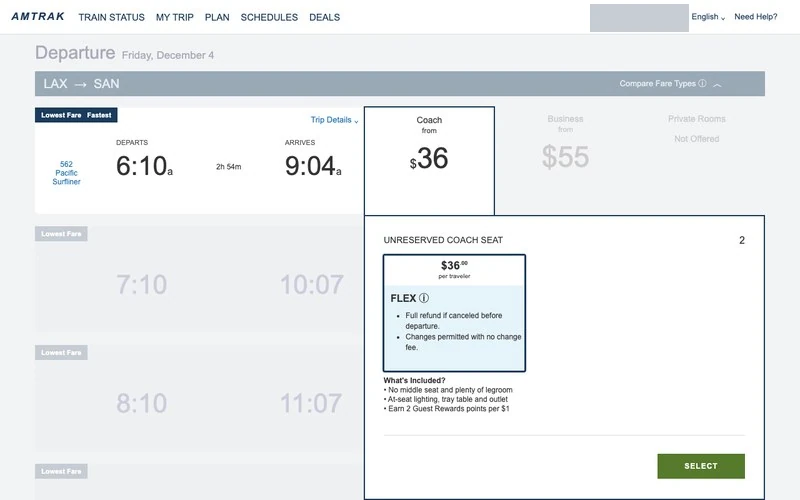
The twin preserves the fare card within the expanded row and the Select button in the lower-right corner. Match score: 67%.
15The first return option
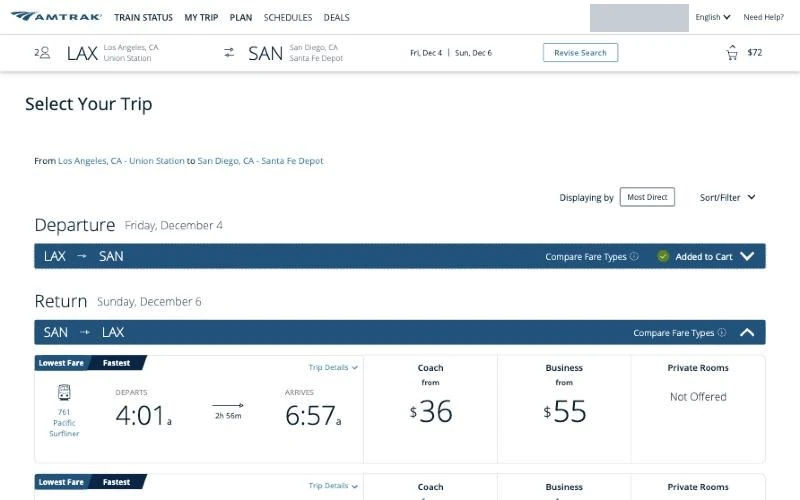
Adding the outbound fare put $72 in the cart. The return timetable opened on train 761 at 4:01 a.m. and offered 13 trains across two pages. Repeated Lowest Fare and Fastest badges did little to distinguish them.
Next: Scroll to later departures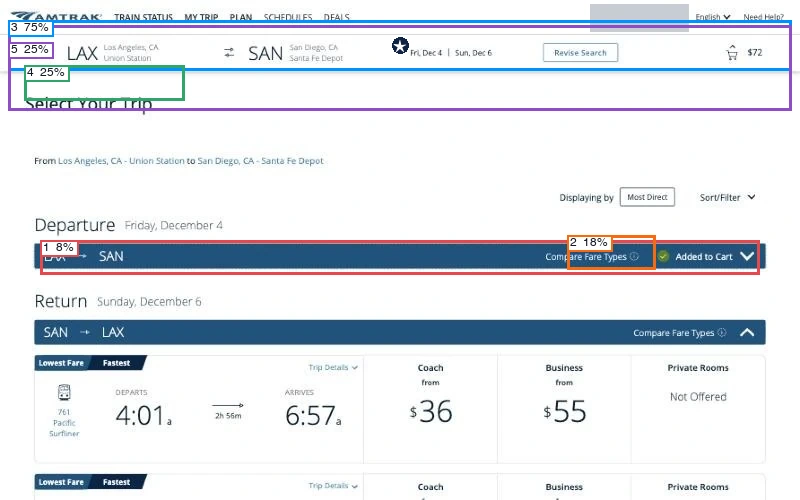
Predicted first click: navigation (44%). The model rated action clarity at 41%, hierarchy at 51% and readability at 76%.
View scores
| Region | Confidence | First click |
|---|---|---|
| 1 · Primary action | 8% | 25% |
| 2 · Secondary action | 18% | 9% |
| 3 · Navigation | 75% | 44% |
| 4 · Main heading | 25% | 21% |
| 5 · Main visual | 25% | 1% |
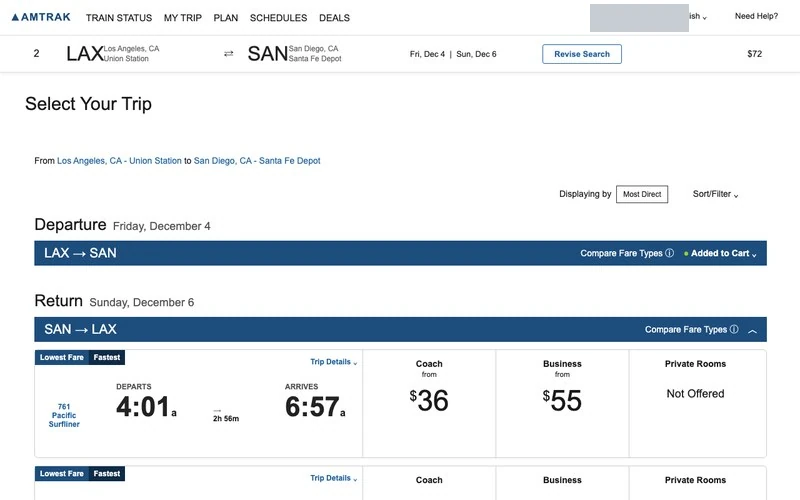
The reconstruction keeps the outbound cart state above the first return departure. Match score: 33%.
16Finding the noon departure
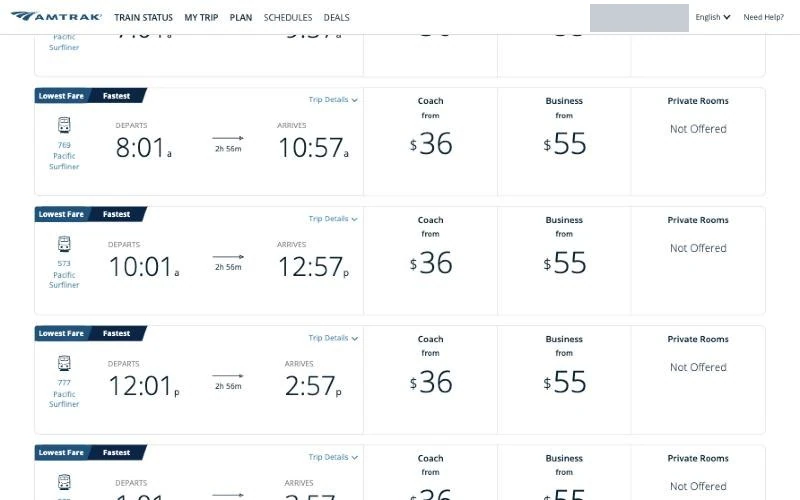
Scrolling brought the 8:01 a.m., 10:01 a.m. and 12:01 p.m. departures into view. Each showed $36 for Coach and $55 for Business, so we used train number and time to locate 777.
Next: Open Coach on the noon departure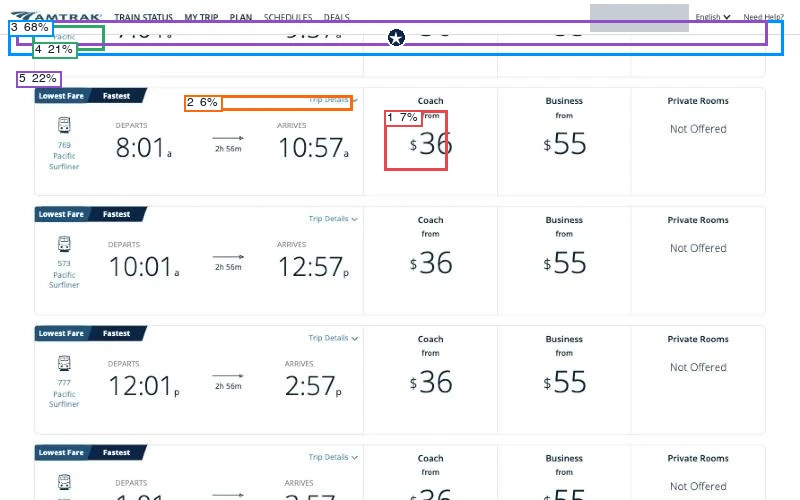
Predicted first click: navigation (85%). The model rated action clarity at 28%, hierarchy at 22% and readability at 73%.
View scores
| Region | Confidence | First click |
|---|---|---|
| 1 · Primary action | 7% | 6% |
| 2 · Secondary action | 6% | 2% |
| 3 · Navigation | 68% | 85% |
| 4 · Main heading | 21% | 5% |
| 5 · Main visual | 22% | 2% |
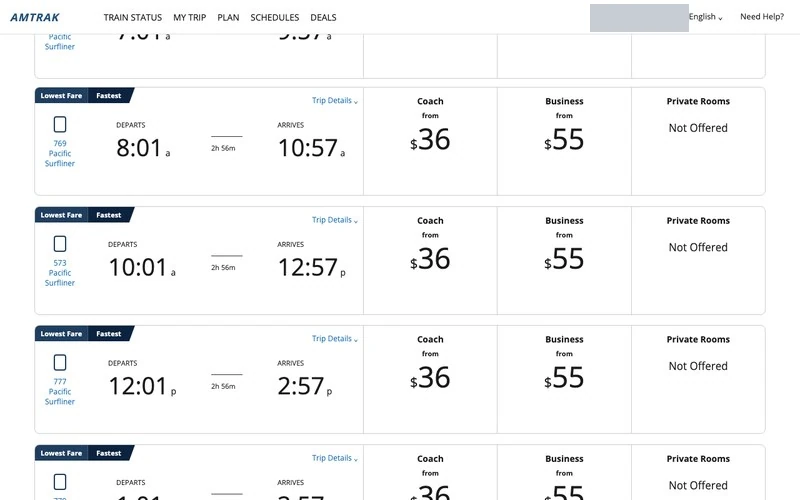
In the twin the successive rows also repeat the same fares, leaving the timetable as the way to tell the departures apart. Match score: 56%.
17Inspecting train 769
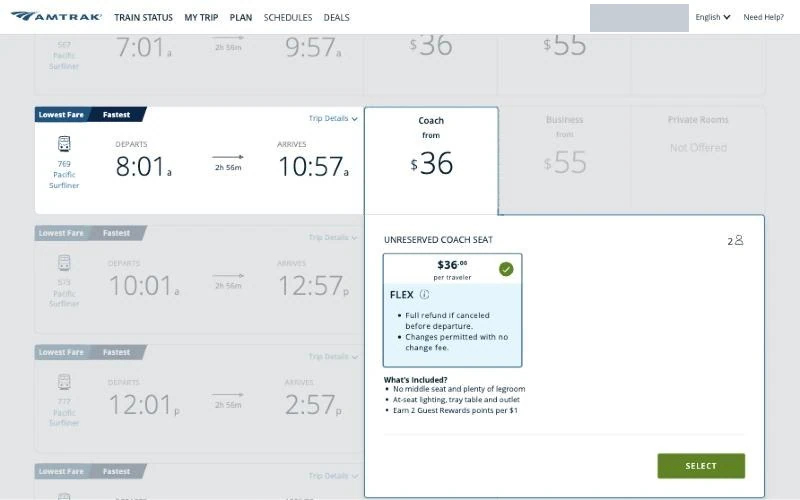
A click aimed at 777 while the list was moving opened train 769, leaving at 8:01 a.m. Opening the fare panel also scrolled its row to the top. We closed it before making a selection.
Next: Close the 769 fare panel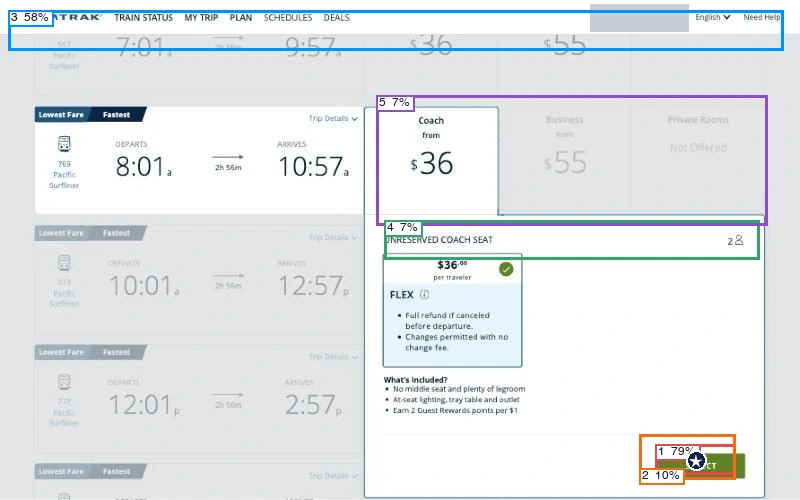
Predicted first click: primary action (61%). The model rated action clarity at 78%, hierarchy at 84% and readability at 65%.
View scores
| Region | Confidence | First click |
|---|---|---|
| 1 · Primary action | 79% | 61% |
| 2 · Secondary action | 10% | 1% |
| 3 · Navigation | 58% | 30% |
| 4 · Main heading | 7% | 4% |
| 5 · Main visual | 7% | 4% |
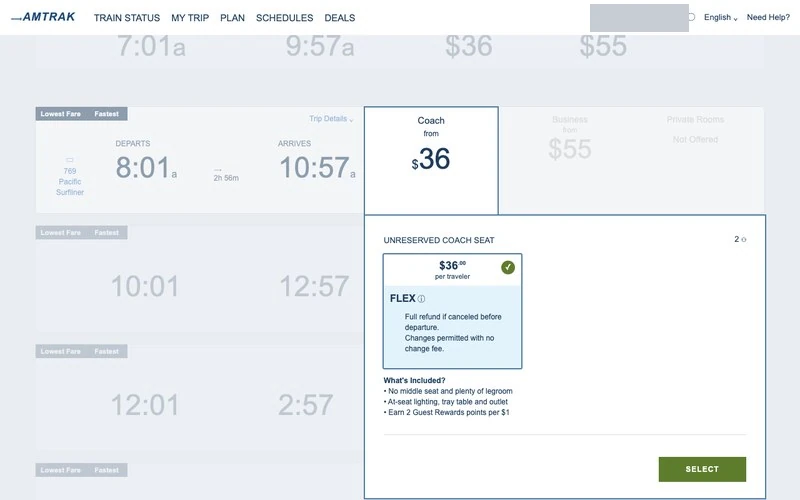
The expanded morning row and its $36 Coach panel remain visible together in the twin. Match score: 56%.
18Selecting train 777
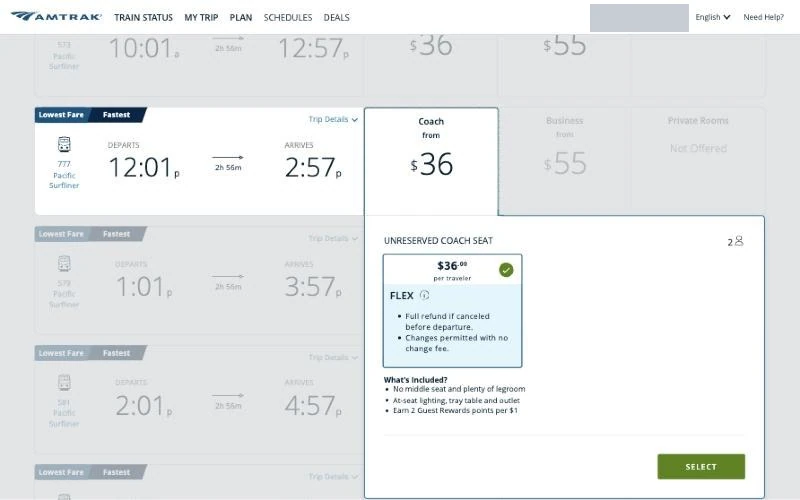
On the reopened fare panel we verified train 777, leaving San Diego at 12:01 p.m. and arriving in Los Angeles at 2:57 p.m., before selecting the $36 fare.
Next: Select the 777 fare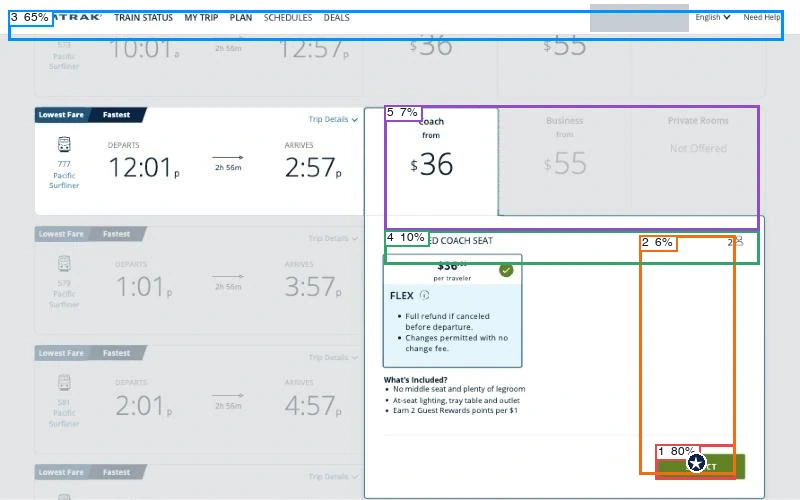
Predicted first click: primary action (52%). The model rated action clarity at 77%, hierarchy at 77% and readability at 52%.
View scores
| Region | Confidence | First click |
|---|---|---|
| 1 · Primary action | 80% | 52% |
| 2 · Secondary action | 6% | 1% |
| 3 · Navigation | 65% | 36% |
| 4 · Main heading | 10% | 5% |
| 5 · Main visual | 7% | 6% |
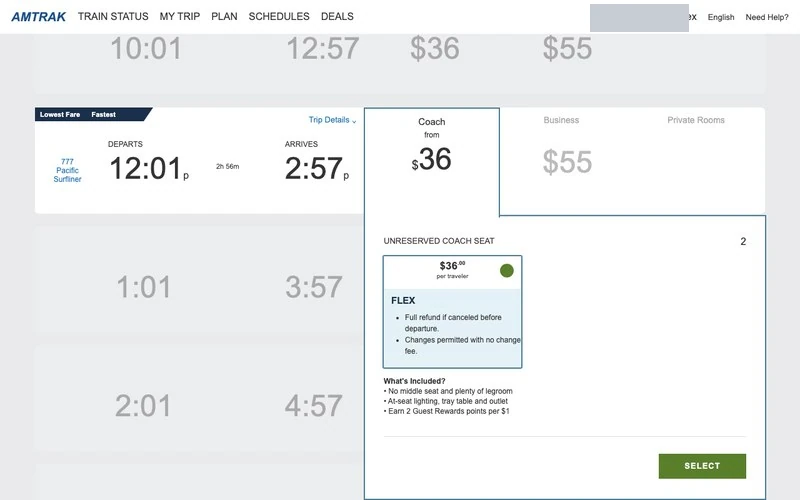
The twin keeps the noon departure aligned with the open fare card, so the itinerary and price can be checked together. Match score: 78%.
Review passengers
With both trains in the cart, we checked the seats and baggage allowance. Amtrak filled in some passenger details from the member profile and asked for the rest.
19Checking the round trip
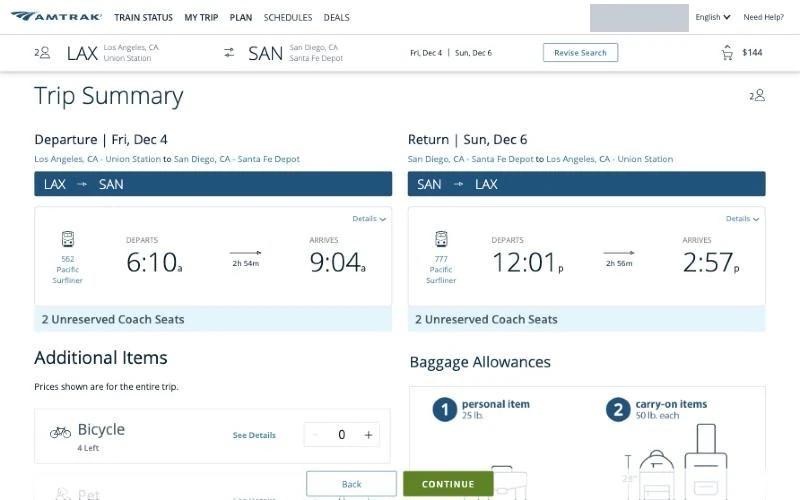
The trip summary showed two unreserved coach seats on train 562 on Friday and train 777 on Sunday. The cart now totaled $144 for both adults and both directions. The fixed Back and Continue bar covered part of the summary at the bottom.
Next: Continue with this itinerary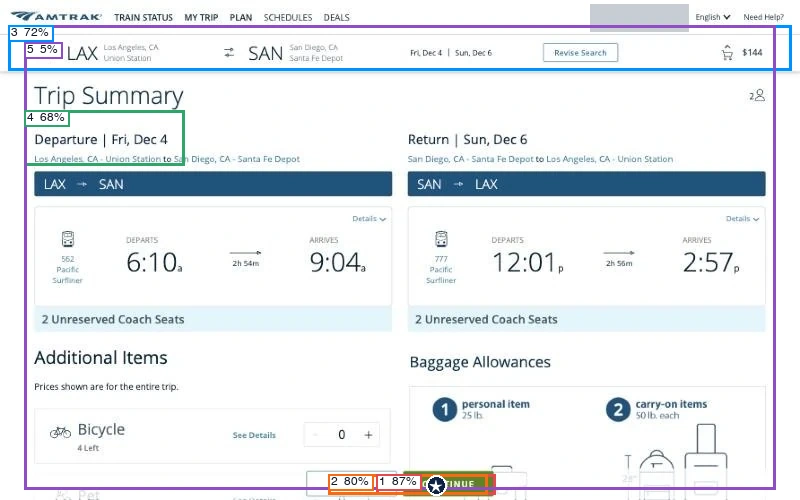
Predicted first click: primary action (47%). The model rated action clarity at 87%, hierarchy at 47% and readability at 81%.
View scores
| Region | Confidence | First click |
|---|---|---|
| 1 · Primary action | 87% | 47% |
| 2 · Secondary action | 80% | 2% |
| 3 · Navigation | 72% | 29% |
| 4 · Main heading | 68% | 21% |
| 5 · Main visual | 5% | 1% |
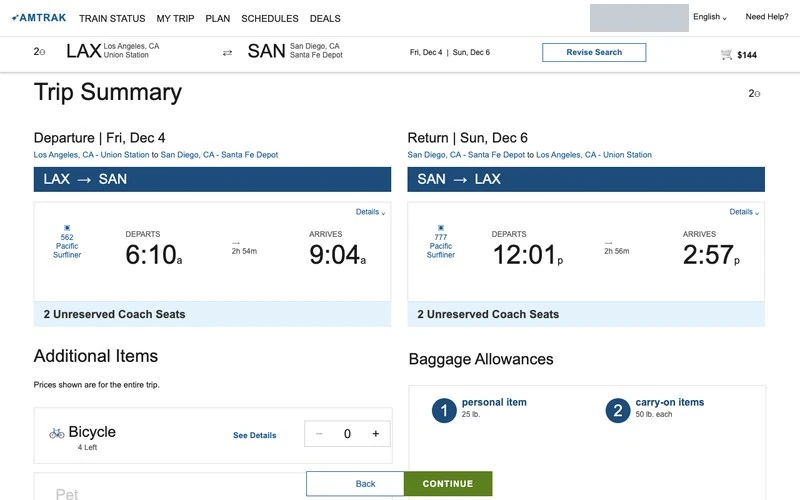
The reconstruction retains the two itinerary columns, making the outbound and return departures visible together. Match score: 56%.
20Reviewing baggage and extras
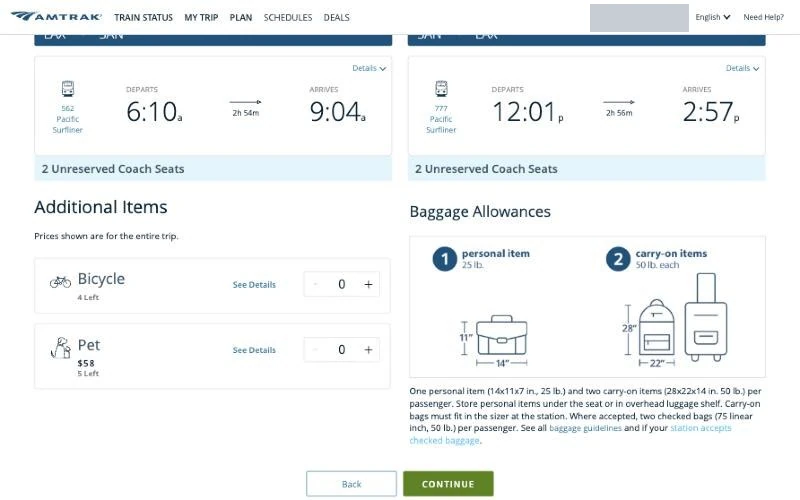
The bicycle and pet quantities stayed at zero. The page separately listed one personal item up to 25 lb and two carry-ons up to 50 lb each per passenger. We continued with the included allowance.
Next: Continue without extras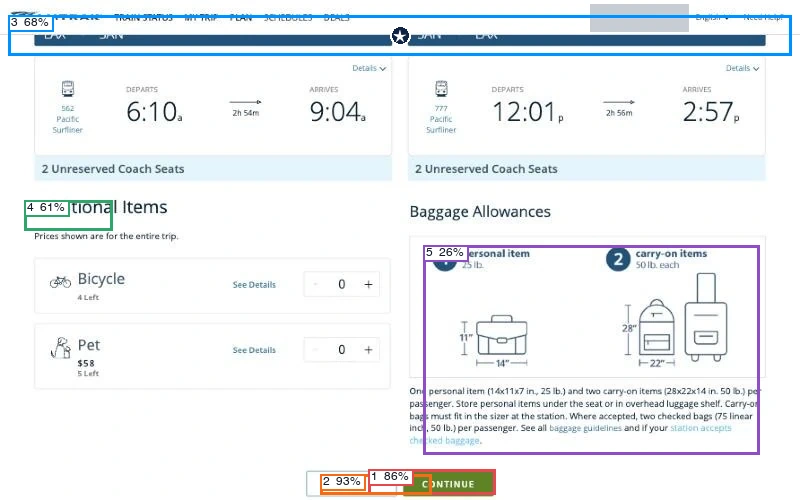
Predicted first click: navigation (31%). The model rated action clarity at 75%, hierarchy at 30% and readability at 75%.
View scores
| Region | Confidence | First click |
|---|---|---|
| 1 · Primary action | 86% | 29% |
| 2 · Secondary action | 93% | 2% |
| 3 · Navigation | 68% | 31% |
| 4 · Main heading | 61% | 22% |
| 5 · Main visual | 26% | 16% |
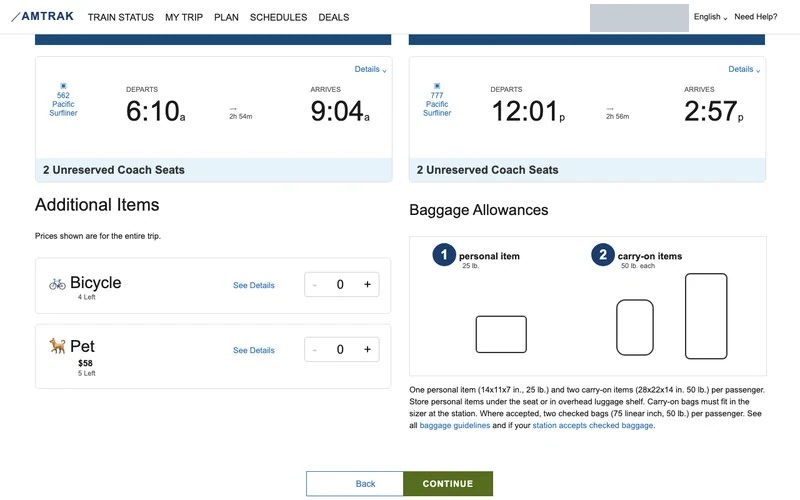
The twin preserves the add-on selectors and baggage allowances, while simplifying the original luggage illustrations. Match score: 67%.
21Entering passenger details
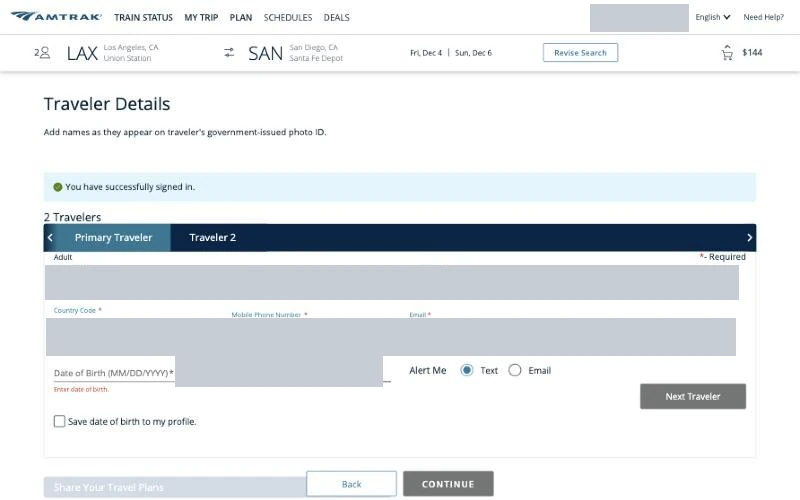
The member profile filled the first traveler’s contact and rewards fields. A person supplied the required date of birth and the second traveler’s details. The page also offered to save the birth date to the profile.
Next: Complete both passenger forms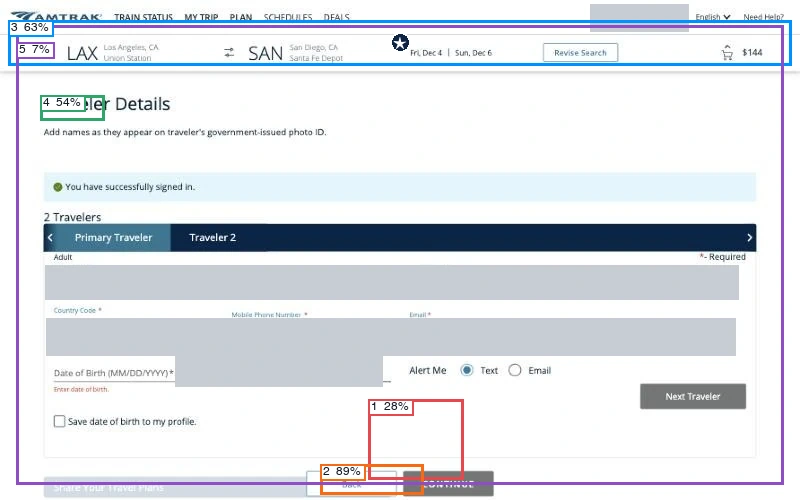
Predicted first click: navigation (57%). The model rated action clarity at 65%, hierarchy at 45% and readability at 82%.
View scores
| Region | Confidence | First click |
|---|---|---|
| 1 · Primary action | 28% | 16% |
| 2 · Secondary action | 89% | 3% |
| 3 · Navigation | 63% | 57% |
| 4 · Main heading | 54% | 23% |
| 5 · Main visual | 7% | 1% |
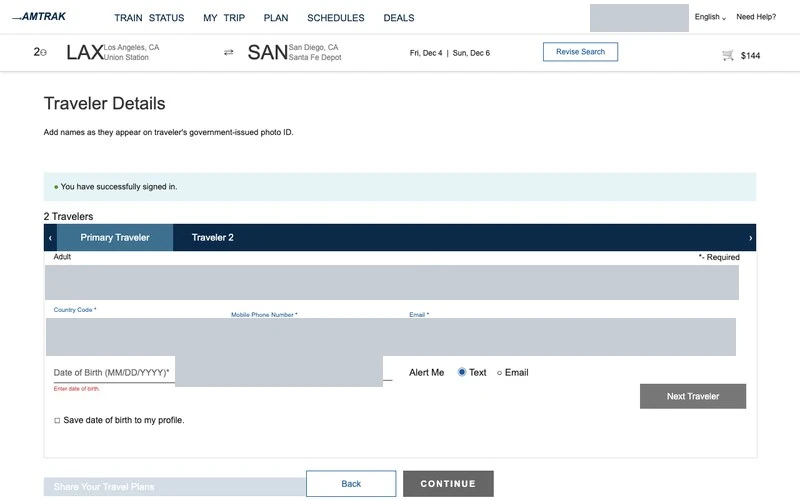
Both versions retain the traveler tabs and the birth-date field. Personal values in the forms have been masked. Match score: 67%.
Checkout
The last decision before payment was whether to add travel protection. After declining it, we checked the balance and itinerary, left the terms unchecked and stopped before entering payment.
22Deciding about travel protection
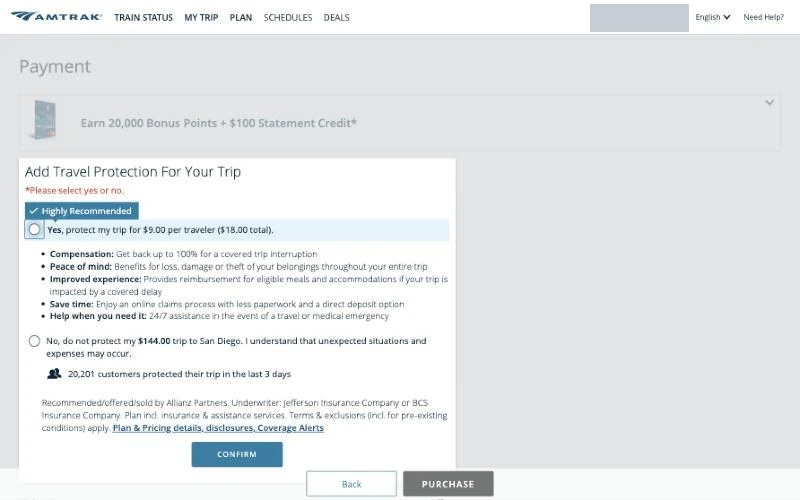
The payment page required a yes-or-no choice about insurance. Accepting would add $9 per traveler, or $18 for the trip. The recommended option listed benefits, while declining required acknowledging the risk and pressing Confirm. We declined.
Next: Decline protection and confirm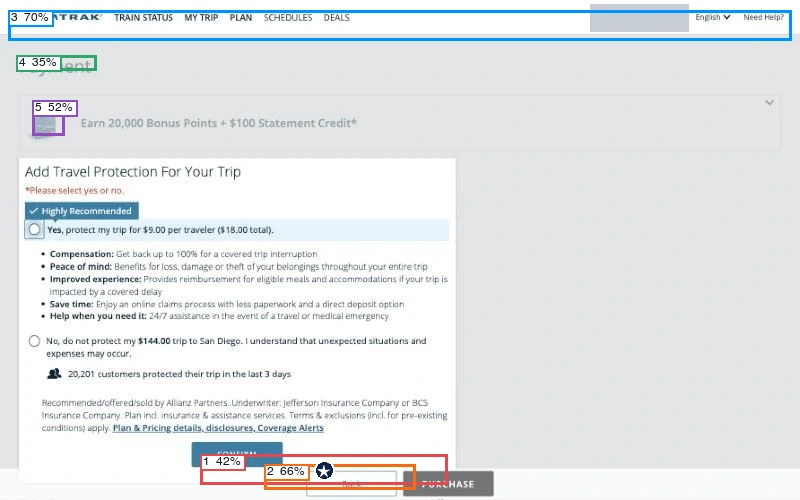
Predicted first click: primary action (48%). The model rated action clarity at 63%, hierarchy at 58% and readability at 82%.
View scores
| Region | Confidence | First click |
|---|---|---|
| 1 · Primary action | 42% | 48% |
| 2 · Secondary action | 66% | 6% |
| 3 · Navigation | 70% | 14% |
| 4 · Main heading | 35% | 28% |
| 5 · Main visual | 52% | 4% |
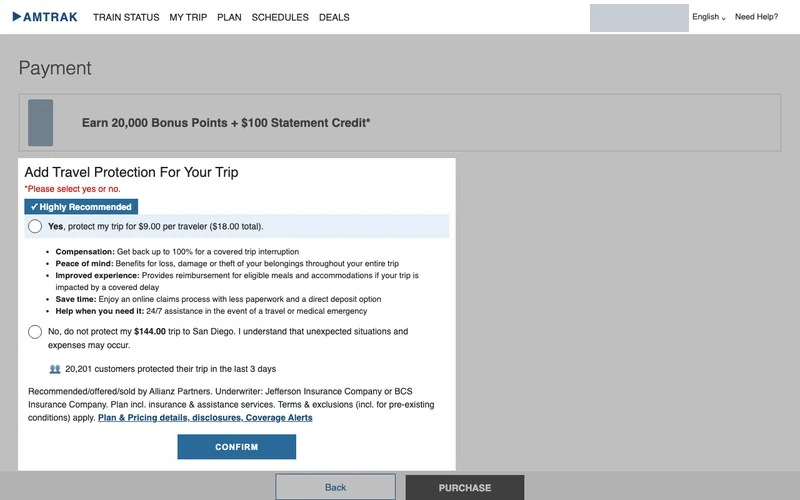
The reconstruction keeps the recommended choice, the decline option and the confirmation button in the same dialog. Match score: 56%.
23Reconciling the balance due
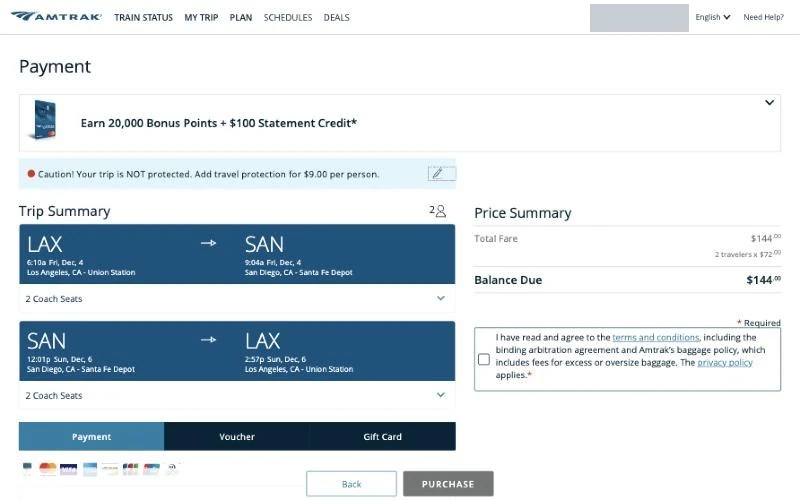
The itinerary and price summary showed $144 due, expressed as two travelers at $72 each. Earlier, $72 covered the outbound trip for both adults; here it covered a round trip for one adult. The required terms box remained empty. A warning about the declined protection remained on the page.
Next: Leave the terms unchecked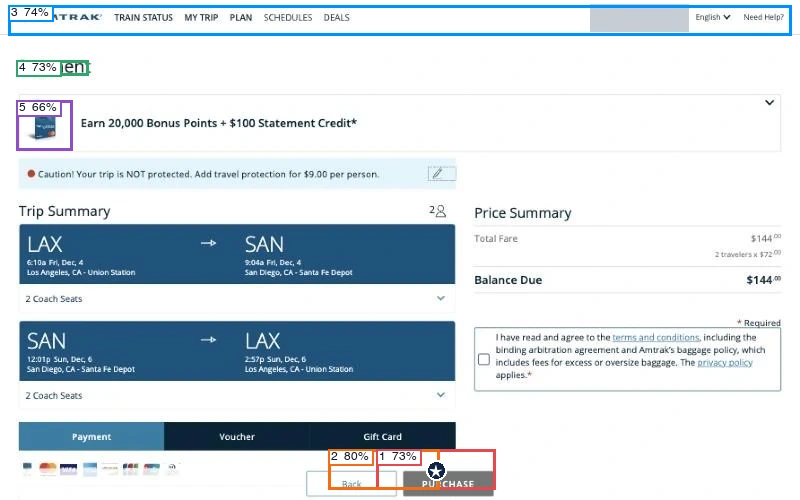
Predicted first click: primary action (31%). The model rated action clarity at 84%, hierarchy at 45% and readability at 78%.
View scores
| Region | Confidence | First click |
|---|---|---|
| 1 · Primary action | 73% | 31% |
| 2 · Secondary action | 80% | 2% |
| 3 · Navigation | 74% | 31% |
| 4 · Main heading | 73% | 25% |
| 5 · Main visual | 66% | 11% |
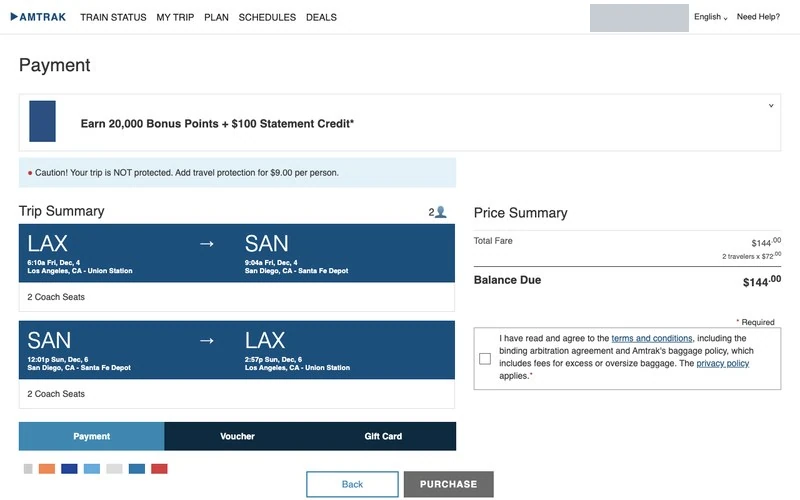
The twin preserves both legs, the balance and the unchecked terms box. The original card-brand logos beneath the Payment tab become colored blocks. Match score: 78%.
24Stopping at payment
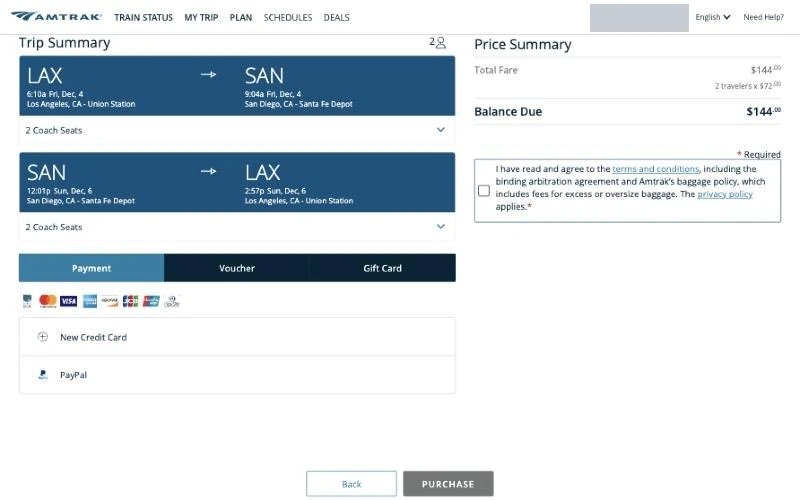
The page offered Payment, Voucher and Gift Card tabs. The account had no saved card, and the new-card and PayPal options stayed closed. Purchase remained disabled; we submitted no payment and received no reservation.
Next: Stop before purchase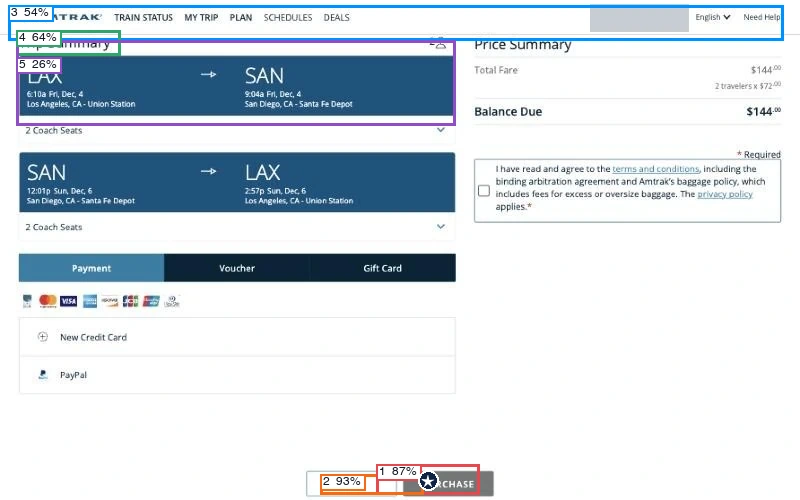
Predicted first click: primary action (34%). The model rated action clarity at 88%, hierarchy at 45% and readability at 85%.
View scores
| Region | Confidence | First click |
|---|---|---|
| 1 · Primary action | 87% | 34% |
| 2 · Secondary action | 93% | 2% |
| 3 · Navigation | 54% | 32% |
| 4 · Main heading | 64% | 23% |
| 5 · Main visual | 26% | 9% |
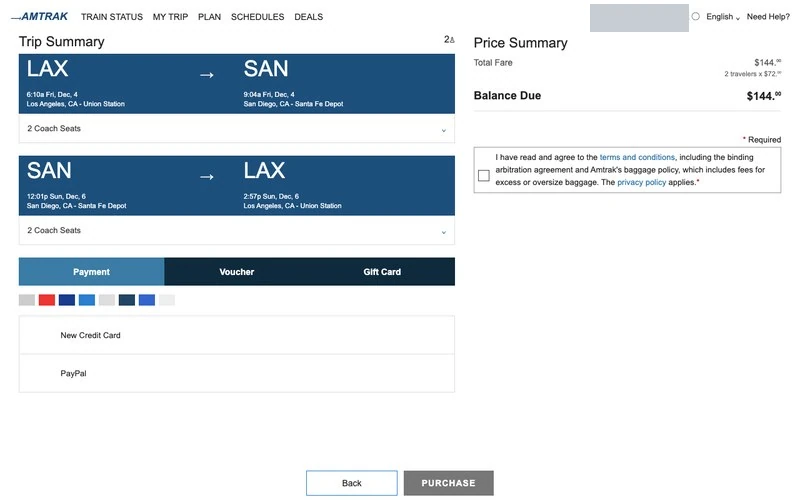
The twin retains the payment choices and the disabled Purchase control beside Back. Match score: 89%.
After checkout
We opened Guest Rewards to see whether a reservation appeared, which passenger details were saved and how much trip history the member could see.
25Looking up a reservation
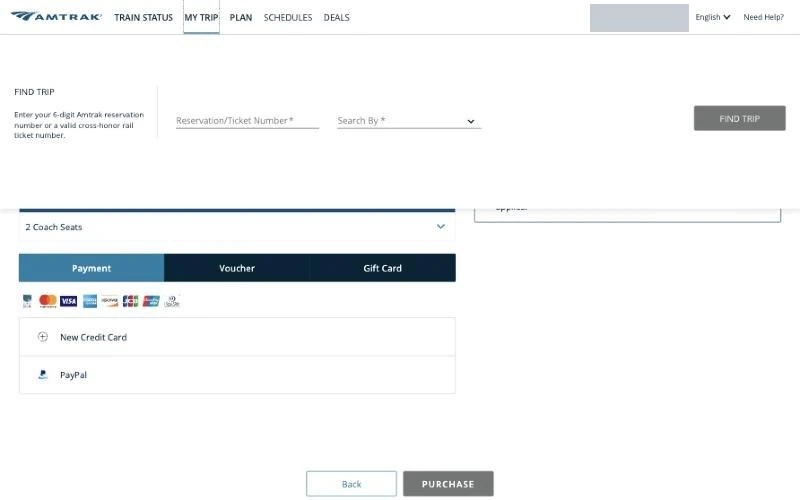
Even after sign-in, My Trip asked for a six-digit reservation number and another search field. The member’s own trips were accessible through a different menu.
Next: Open the member menu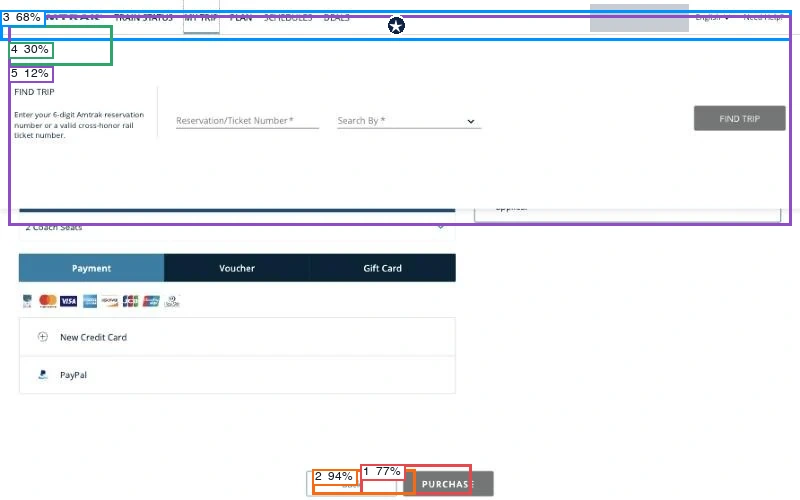
Predicted first click: navigation (70%). The model rated action clarity at 63%, hierarchy at 36% and readability at 77%.
View scores
| Region | Confidence | First click |
|---|---|---|
| 1 · Primary action | 77% | 20% |
| 2 · Secondary action | 94% | 2% |
| 3 · Navigation | 68% | 70% |
| 4 · Main heading | 30% | 7% |
| 5 · Main visual | 12% | 1% |
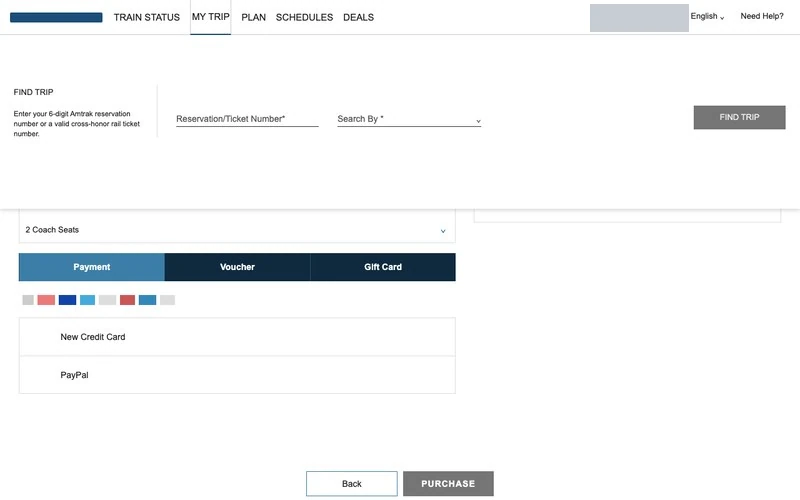
The reconstruction keeps the reservation lookup fields in a panel over the payment page. Match score: 89%.
26Opening the member menu
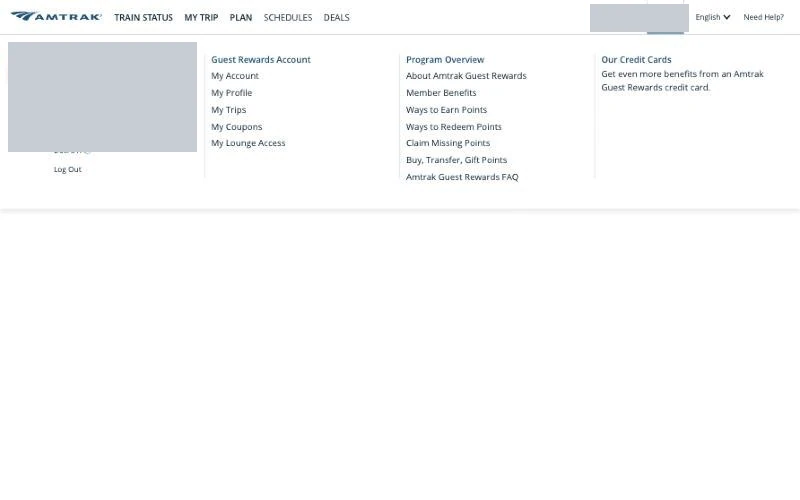
The Guest Rewards menu contained links to the account, profile, trips, coupons, lounge access and sign-out. We used My Trips to inspect the account after checkout.
Next: Open My Trips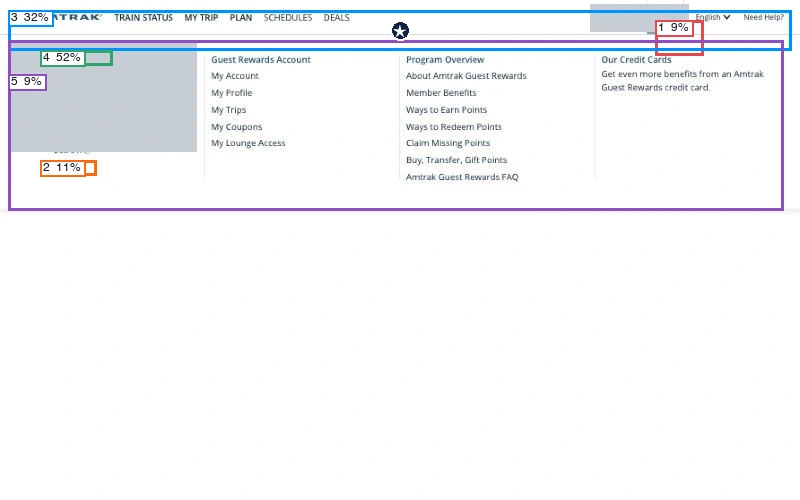
Predicted first click: navigation (82%). The model rated action clarity at 11%, hierarchy at 26% and readability at 70%.
View scores
| Region | Confidence | First click |
|---|---|---|
| 1 · Primary action | 9% | 1% |
| 2 · Secondary action | 11% | 0% |
| 3 · Navigation | 32% | 82% |
| 4 · Main heading | 52% | 15% |
| 5 · Main visual | 9% | 2% |
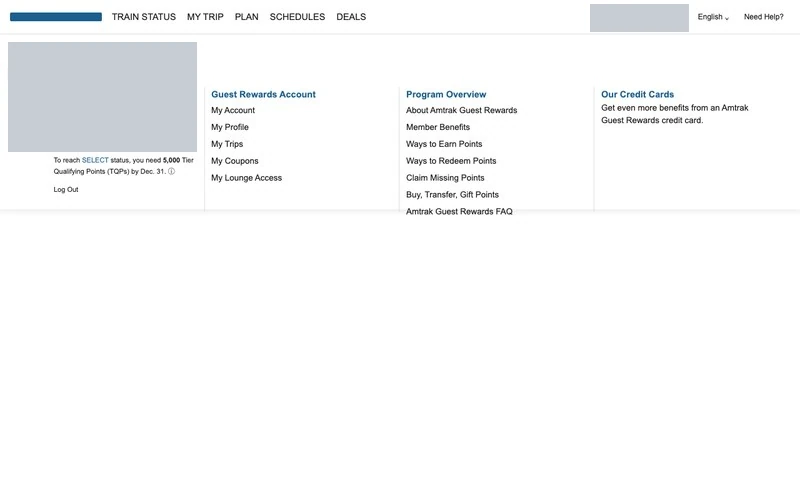
The twin preserves the menu columns and account destinations. Member identifiers are masked. Match score: 56%.
27Checking upcoming trips
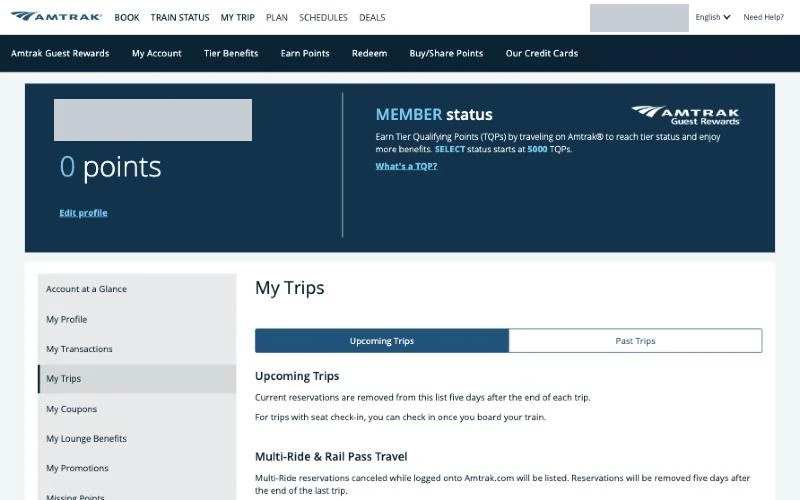
The upcoming list contained no trip. Together with the disabled Purchase button, this shows where the session ended: the itinerary reached the cart without becoming a reservation.
Next: Check past trips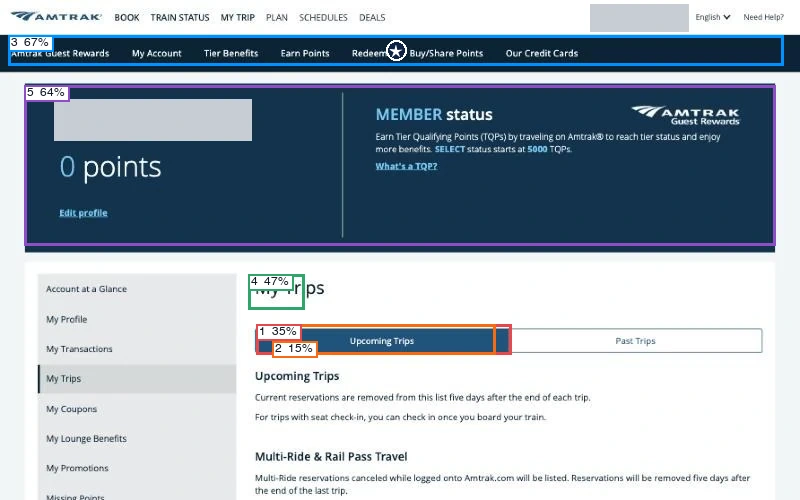
Predicted first click: navigation (73%). The model rated action clarity at 20%, hierarchy at 68% and readability at 81%.
View scores
| Region | Confidence | First click |
|---|---|---|
| 1 · Primary action | 35% | 3% |
| 2 · Secondary action | 15% | 1% |
| 3 · Navigation | 67% | 73% |
| 4 · Main heading | 47% | 14% |
| 5 · Main visual | 64% | 9% |
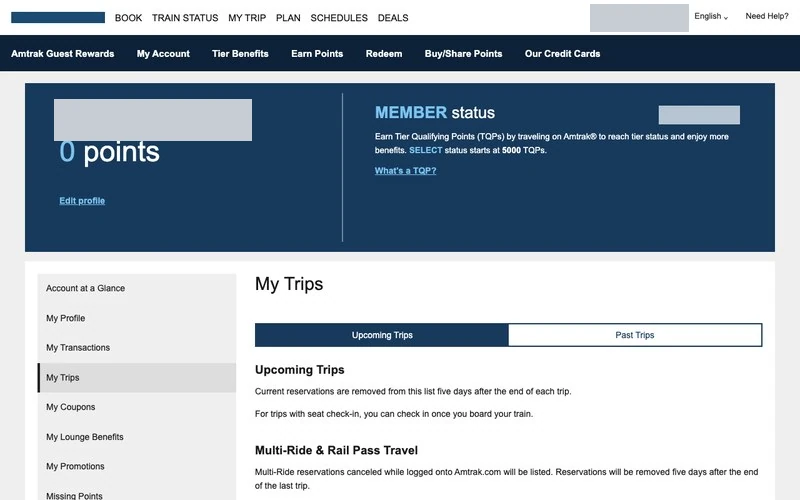
The twin keeps the selected upcoming tab and its empty state beneath the member summary. Match score: 56%.
28Checking past trips
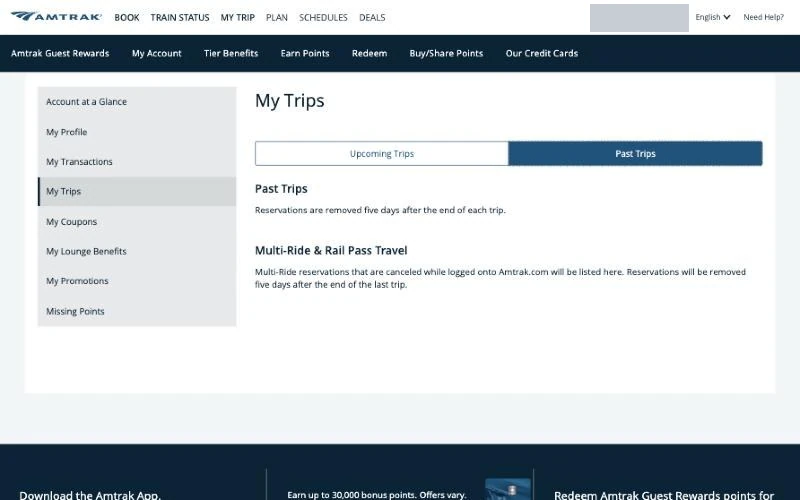
The past tab was also empty and explained that reservations disappear five days after a trip ends. An assistant trying to infer a member’s usual route from this list would have limited history.
Next: Open My Profile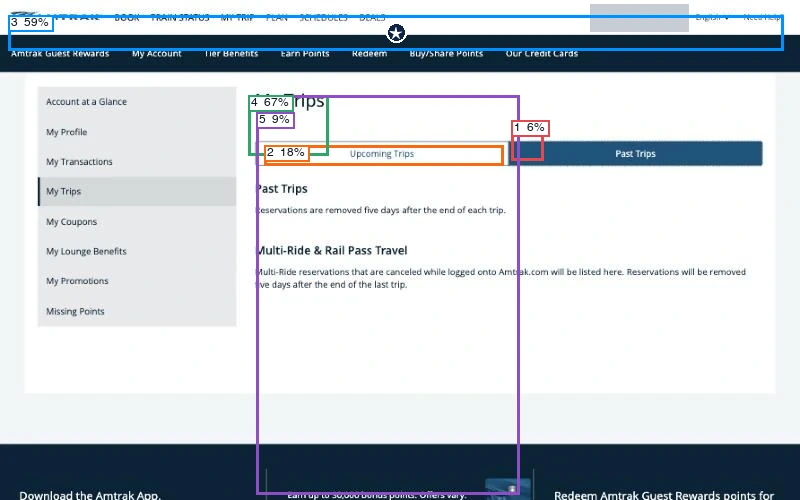
Predicted first click: navigation (80%). The model rated action clarity at 17%, hierarchy at 55% and readability at 87%.
View scores
| Region | Confidence | First click |
|---|---|---|
| 1 · Primary action | 6% | 3% |
| 2 · Secondary action | 18% | 2% |
| 3 · Navigation | 59% | 80% |
| 4 · Main heading | 67% | 14% |
| 5 · Main visual | 9% | 1% |
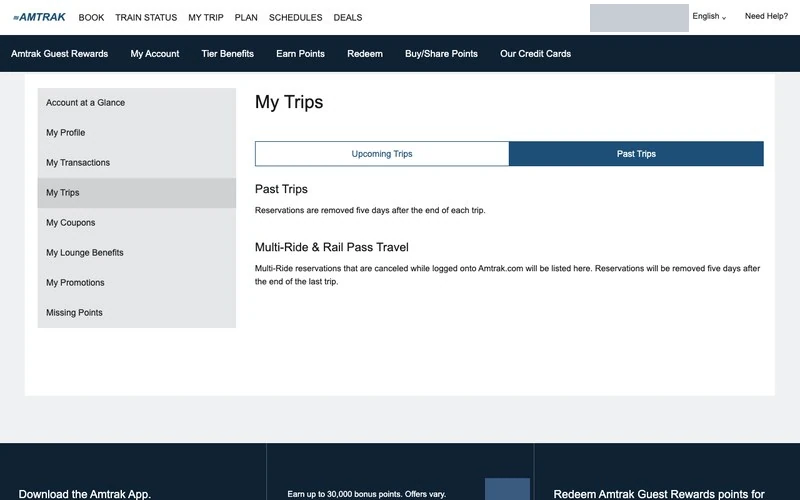
The reconstruction preserves the past-trip tab and the explanation beside the empty list. Match score: 56%.
29Reviewing account details
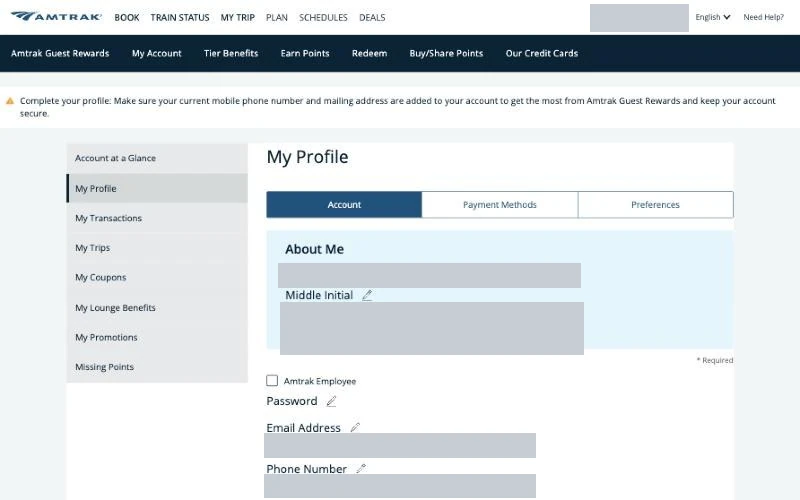
The profile brought together member information, password, email and phone settings. Most changes had an edit control, while changing the member name required contacting Amtrak by phone. A banner prompted the member to complete the profile.
Next: Scroll through the profile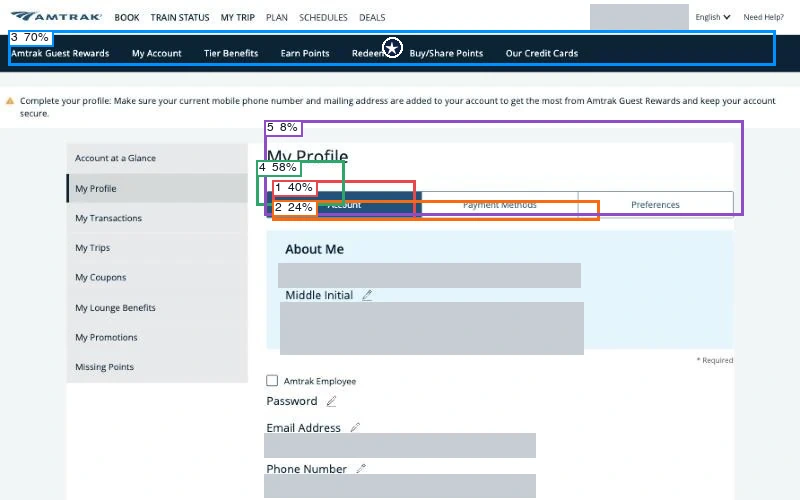
Predicted first click: navigation (77%). The model rated action clarity at 19%, hierarchy at 54% and readability at 88%.
View scores
| Region | Confidence | First click |
|---|---|---|
| 1 · Primary action | 40% | 2% |
| 2 · Secondary action | 24% | 1% |
| 3 · Navigation | 70% | 77% |
| 4 · Main heading | 58% | 19% |
| 5 · Main visual | 8% | 1% |
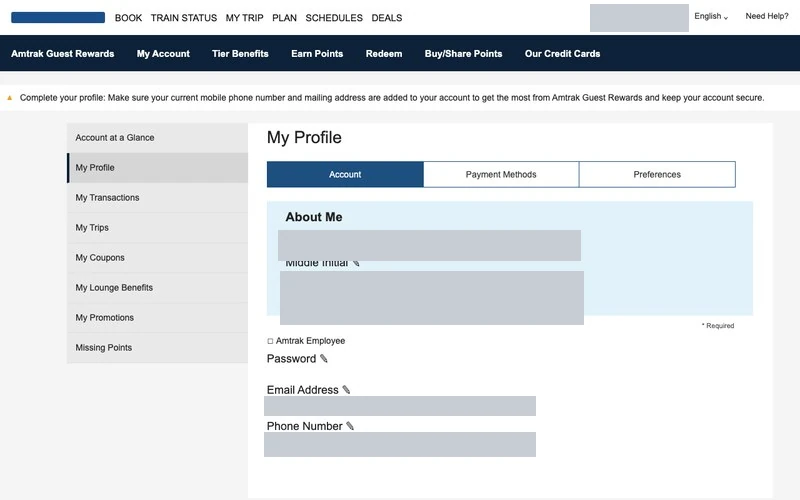
The twin keeps the profile tabs and edit layout. Account and contact values are masked in both views. Match score: 44%.
30Checking what the profile saved
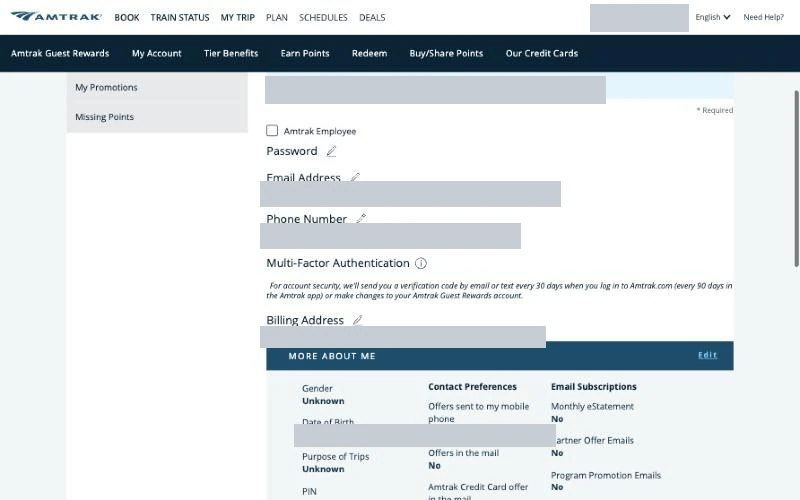
The profile described verification by email or text, showed an empty billing address and displayed the date of birth entered earlier. Marketing choices remained off. Reaching payment had already changed one profile field.
Next: Open Payment Methods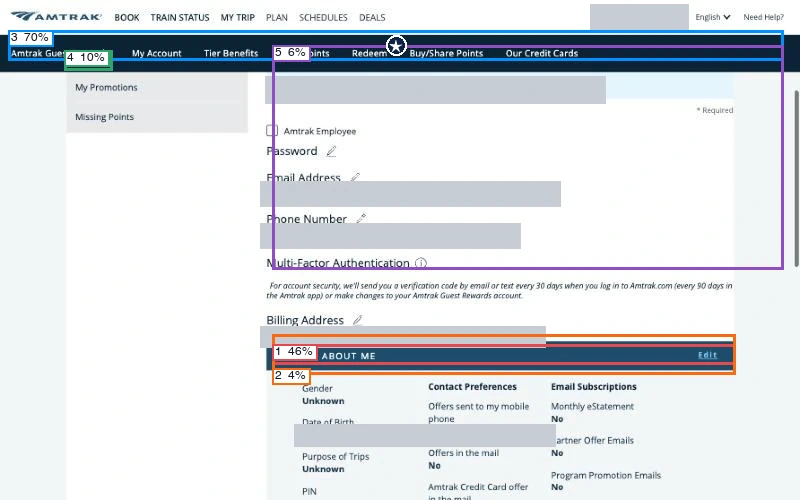
Predicted first click: navigation (85%). The model rated action clarity at 25%, hierarchy at 32% and readability at 72%.
View scores
| Region | Confidence | First click |
|---|---|---|
| 1 · Primary action | 46% | 10% |
| 2 · Secondary action | 4% | 2% |
| 3 · Navigation | 70% | 85% |
| 4 · Main heading | 10% | 2% |
| 5 · Main visual | 6% | 1% |
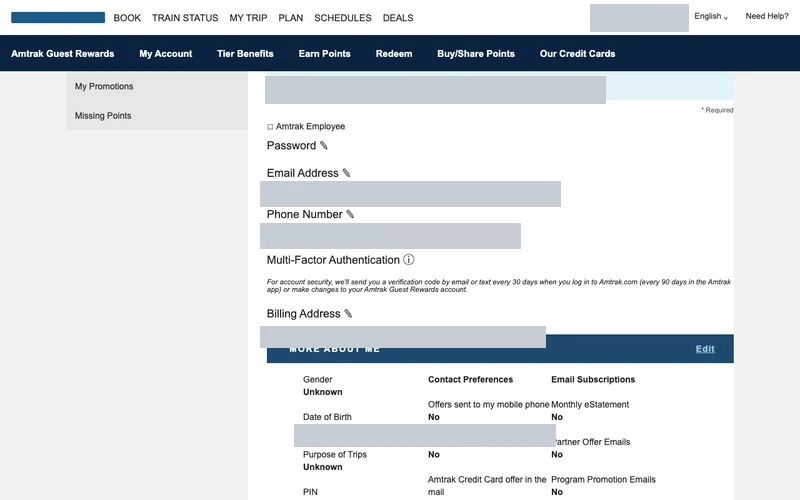
The reconstruction retains the authentication, billing and preference sections. The saved personal values are masked. Match score: 44%.
31Reviewing payment methods
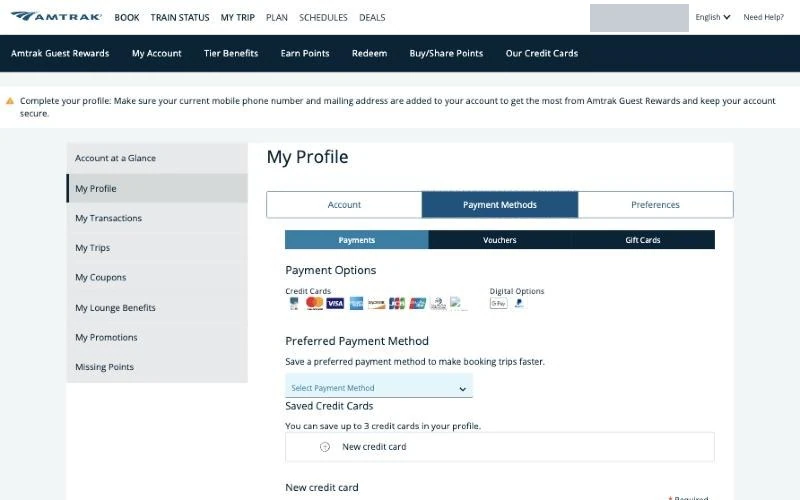
The account had room for up to three saved cards but held none, and the preferred payment method was unset. The page also listed digital payment options, vouchers and gift cards.
Next: Open Preferences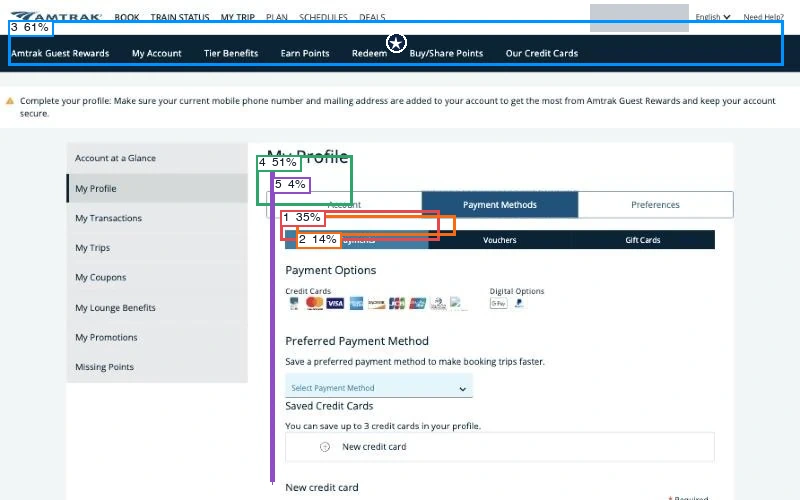
Predicted first click: navigation (64%). The model rated action clarity at 21%, hierarchy at 42% and readability at 86%.
View scores
| Region | Confidence | First click |
|---|---|---|
| 1 · Primary action | 35% | 4% |
| 2 · Secondary action | 14% | 2% |
| 3 · Navigation | 61% | 64% |
| 4 · Main heading | 51% | 30% |
| 5 · Main visual | 4% | 0% |
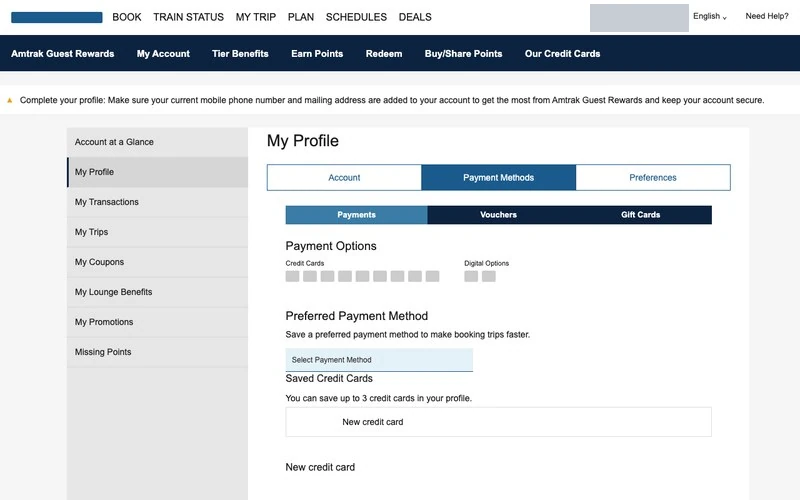
The twin retains the payment settings and their empty states, while simplifying the row of brand marks. Match score: 56%.
32Checking station preferences
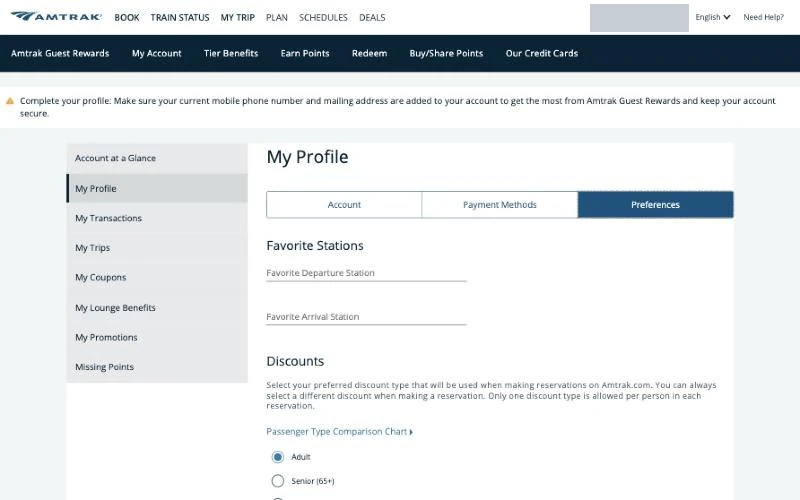
Favorite departure and arrival stations were both empty, and the default discount type was Adult. Signing in could fill traveler details but could not settle which San Diego station to choose.
Next: Open My Transactions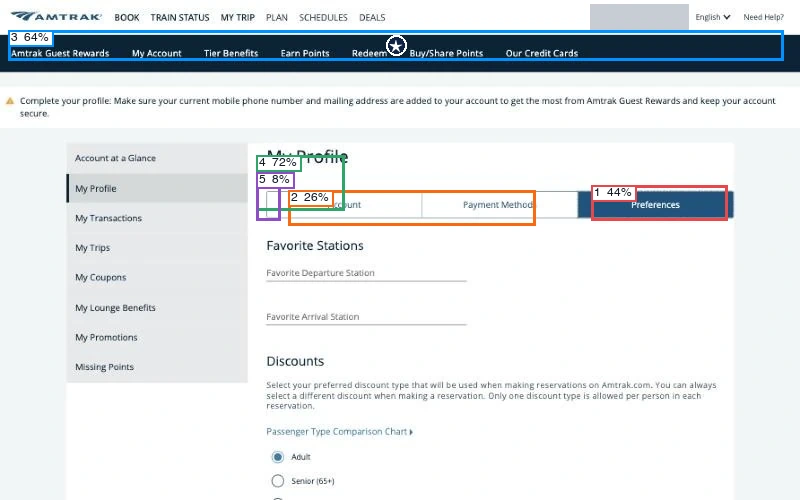
Predicted first click: navigation (78%). The model rated action clarity at 15%, hierarchy at 47% and readability at 75%.
View scores
| Region | Confidence | First click |
|---|---|---|
| 1 · Primary action | 44% | 2% |
| 2 · Secondary action | 26% | 1% |
| 3 · Navigation | 64% | 78% |
| 4 · Main heading | 72% | 19% |
| 5 · Main visual | 8% | 0% |
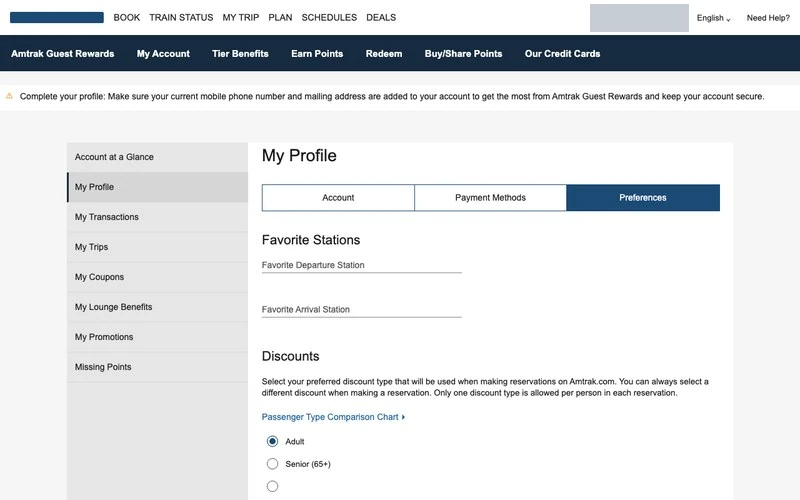
The reconstruction keeps the empty station fields within the Preferences tab. Match score: 44%.
33Reading the transaction window
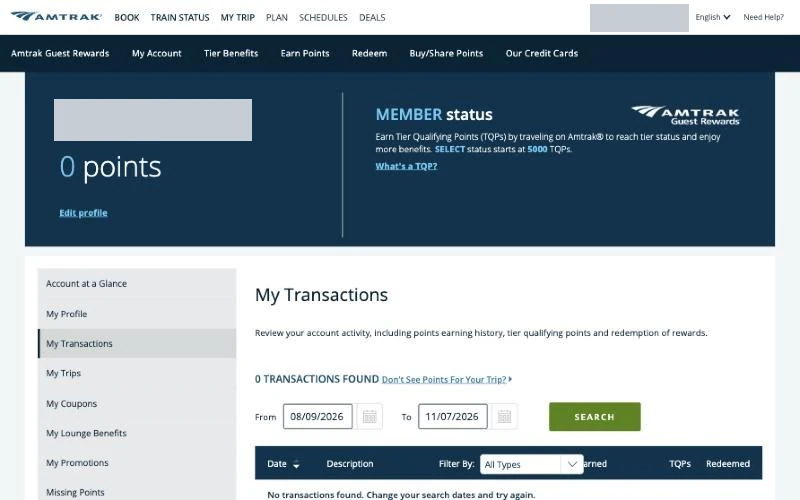
The transaction list showed zero results for its selected date window. That filter did not establish the outcome of this checkout; the payment controls and upcoming trips supplied the direct evidence.
Next: Open My Coupons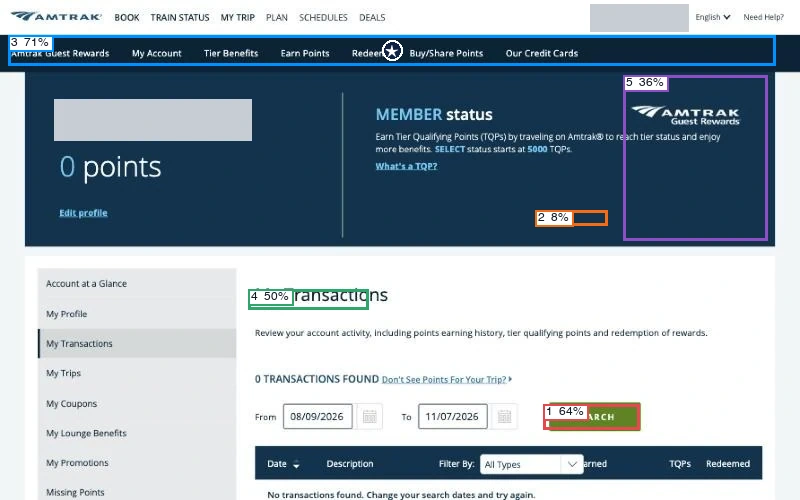
Predicted first click: navigation (69%). The model rated action clarity at 24%, hierarchy at 60% and readability at 84%.
View scores
| Region | Confidence | First click |
|---|---|---|
| 1 · Primary action | 64% | 6% |
| 2 · Secondary action | 8% | 1% |
| 3 · Navigation | 71% | 69% |
| 4 · Main heading | 50% | 17% |
| 5 · Main visual | 36% | 7% |
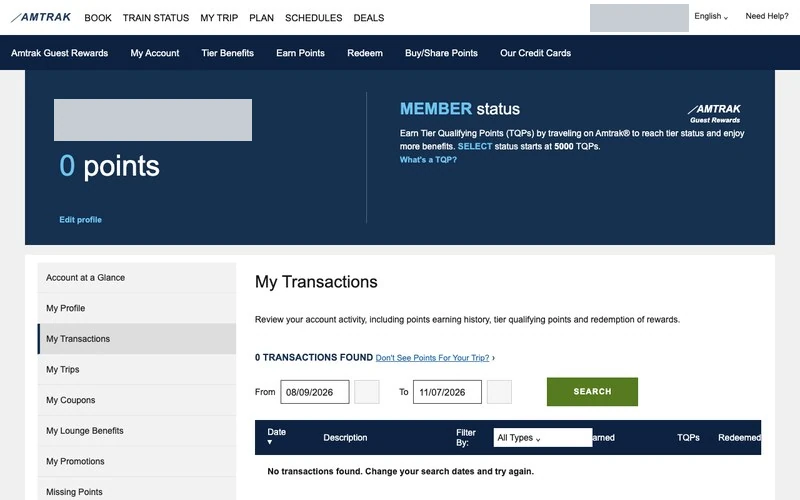
The twin retains the date filters and transaction columns, so the scope of the empty result remains visible. Match score: 44%.
34Checking coupons
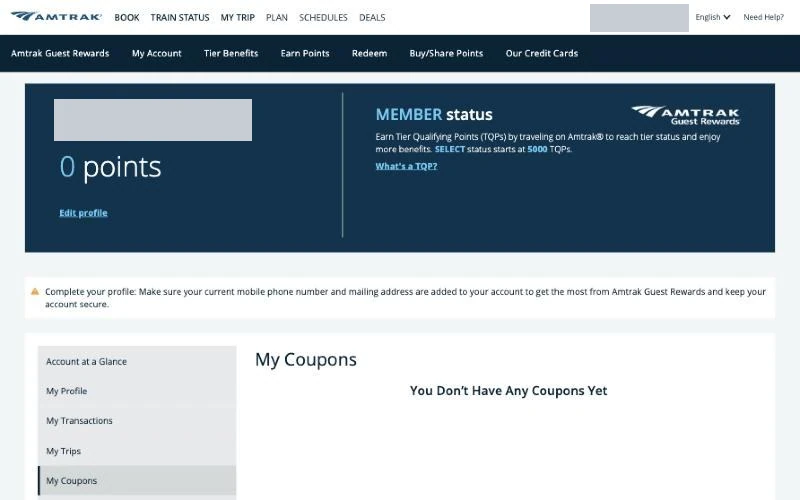
The member’s coupon page showed no available coupons, completing the account review after the booking session.
Next: End of session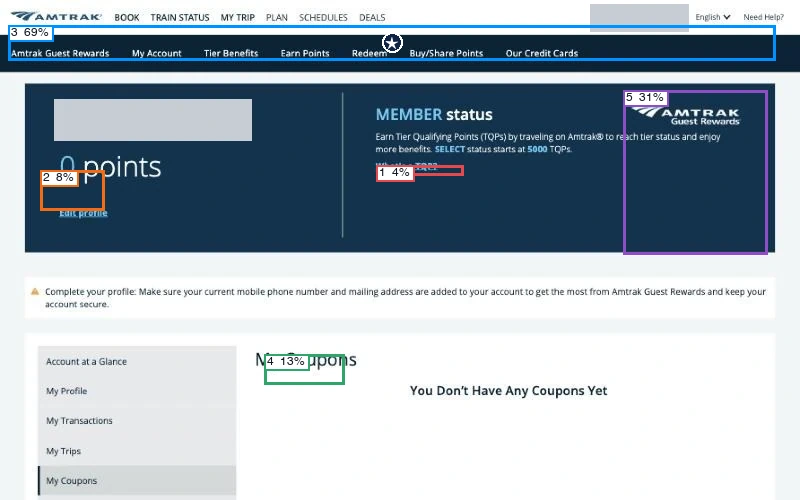
Predicted first click: navigation (73%). The model rated action clarity at 17%, hierarchy at 63% and readability at 81%.
View scores
| Region | Confidence | First click |
|---|---|---|
| 1 · Primary action | 4% | 1% |
| 2 · Secondary action | 8% | 1% |
| 3 · Navigation | 69% | 73% |
| 4 · Main heading | 13% | 17% |
| 5 · Main visual | 31% | 8% |
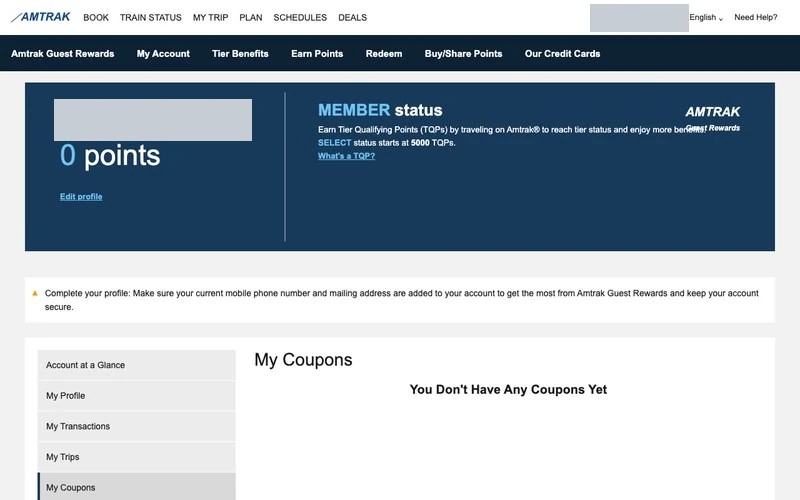
The reconstruction retains the empty coupon state beneath the account header. Match score: 67%.